
In this blog, we will discuss one of the problems: the system refreshes as per the target_lag even if no new data in the downstream tables. Most of the time, nothing has changed, which means we’re wasting compute for no reason.
If your data does not change, your compute should not either. Here is how to optimize your Dynamic table to save resources.
Core concepts use in this blog: –
Snowflake:
Snowflake is a fully managed cloud data warehouse that lets you store data and SQL queries at massive scale—without managing servers.
Compute Resources:
Compute resources in Snowflake are the processing power (virtual warehouses) that Snowflake uses to run your queries, load data, and perform calculations.
In simple way:
Storage = where data lives
Compute = the power used to process the data
Dynamic table:
In Snowflake, a Dynamic Table acts as a self-managing data container that bridges the gap between a query and a physical table. Instead of you manually inserting records, you provide Snowflake with a “blueprint” (a SQL query), and the system ensures the table’s physical content always matches that blueprint.
Stream:
A Stream in Snowflake is a tool that keeps track of all changes made to a table so you can process only the updated data instead of scanning the whole table.
Task:
Tasks can run at specific times you choose, or they can automatically start when something happens — for example, when new data shows up in a stream.
Scenario:
The client has requested that data be inserted every 1 hour, but sometimes there may be no new data coming into the downstream tables.
Steps: –
First, we go through the traditional approach and below are the steps.
1. Create source data:
— Choose a role/warehouse you can use
USE ROLE SYSADMIN;
USE WAREHOUSE SNOWFLAKE_LEARNING_WH;
— Create database/schema for the demo
CREATE DATABASE IF NOT EXISTS DEMO_DB;
CREATE SCHEMA IF NOT EXISTS DEMO_DB.DEMO_SCHEMA;
USE SCHEMA DEMO_DB.DEMO_SCHEMA;
— Base table: product_changes
CREATE OR REPLACE TABLE product_changes (
product_code VARCHAR(50),
product_name VARCHAR(200),
price NUMBER(10, 2),
price_start_date TIMESTAMP_NTZ(9),
last_updated TIMESTAMP_NTZ DEFAULT CURRENT_TIMESTAMP()
);
— Seed a few rows
INSERT INTO product_changes (product_code, product_name, price, price_start_date,last_updated)
SELECT
‘PC-‘ || LPAD(TO_VARCHAR(MOD(SEQ4(), 10000) + 1), 3, ‘0’) AS product_code,
‘Product ‘ || LPAD(TO_VARCHAR(MOD(SEQ4(), 10000) + 1), 3, ‘0’) AS product_name,
ROUND(10.00 + (MOD(SEQ4(), 10000) * 5) + (SEQ4() * 0.01), 2) AS price,
DATEADD(MINUTE, SEQ4() * 5, ‘2025-01-01 00:00:00’) AS PRICE_START_DATE,
CURRENT_TIMESTAMP() AS last_updated
FROM
TABLE(GENERATOR(ROWCOUNT => 100000000));

— Create dynamic table
CREATE OR REPLACE DYNAMIC TABLE product_current_price_v1
TARGET_LAG = ‘1 hour’
WAREHOUSE = SNOWFLAKE_LEARNING_WH
INITIALIZE = ON_SCHEDULE
REFRESH_MODE = INCREMENTAL
AS
SELECT
h.product_code,
h.product_name,
h.price,
h.price_start_date
FROM product_changes h
INNER JOIN (
SELECT product_code, MAX(price_start_date) max_price_start_date
FROM product_changes
GROUP BY product_code
) m ON h.price_start_date = m.max_price_start_date AND h.product_code = m.product_code;
–Manually Refresh
ALTER DYNAMIC TABLE product_current_price_v1 REFRESH;
Always, we need to do manual refresh after an hour to check the new data is in table
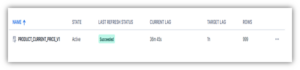
Because Snowflake uses a pay‑as‑you‑go credit model for compute, keeping a dynamic table refreshed every hour means compute resources are running continuously. Over time, this constant usage can drive up costs, making frequent refresh intervals less cost‑effective for customers.
To tackle this problem in a smarter and more cost‑efficient way, we follow a few simple steps that make the entire process smoother and more optimized:
First, we set the target_lag to 365 days when creating the dynamic table. This ensures Snowflake doesn’t continually consume compute resources for frequent refreshes, helping us optimize costs right from the start.
— Create dynamic table
CREATE OR REPLACE DYNAMIC TABLE product_current_price_v1
TARGET_LAG = ‘365 days’
WAREHOUSE = SNOWFLAKE_LEARNING_WH
INITIALIZE = ON_SCHEDULE
REFRESH_MODE = INCREMENTAL
AS
SELECT
h.product_code,
h.product_name,
h.price,
h.price_start_date
FROM product_changes h
INNER JOIN (
SELECT product_code, MAX(price_start_date) max_price_start_date
FROM product_changes
GROUP BY product_code
) m ON h.price_start_date = m.max_price_start_date AND h.product_code = m.product_code;
— A) Stream to detect changes in data
CREATE OR REPLACE STREAM STR_PRODUCT_CHANGES ON TABLE PRODUCT_CHANGES;
— Stored procedure: refresh only when stream has data
CREATE OR REPLACE PROCEDURE SP_REFRESH_DT_IF_NEW()
RETURNS VARCHAR
LANGUAGE SQL
EXECUTE AS OWNER
AS
$$
DECLARE
v_has_data BOOLEAN;
BEGIN
SELECT SYSTEM$STREAM_HAS_DATA(‘STR_PRODUCT_CHANGESS’) INTO :v_has_data;
IF (v_has_data) THEN
ALTER DYNAMIC TABLE DEMO_DB.DEMO_SCHEMA.PRODUCT_CURRENT_PRICE_V1
REFRESH;
RETURN ‘Refreshed dynamic table DT_SALES (new data detected).’;
ELSE
RETURN ‘Skipped refresh (no new data).’;
END IF;
END;
$$;
— Create TASK
Here, we can schedule as per requirement
EXAMPLE:
CREATE OR REPLACE TASK PUBLIC.T_REFRESH_DT_IF_NEW
WAREHOUSE = SNOWFLAKE_LEARNING_WH
SCHEDULE = ‘5 MINUTE’
AS
CALL PUBLIC.SP_REFRESH_DT_IF_NEW();
ALTER TASK PUBLIC.T_REFRESH_DT_IF_NEW RESUME;
Conclusion:
Optimizing Snowflake compute isn’t just about reducing costs—it’s about making your data pipelines smarter, faster, and more efficient. By carefully managing how and when dynamic tables refresh, teams can significantly cut down on unnecessary compute usage while still maintaining reliable, up‑to‑date data.
Adjusting refresh intervals, thoughtfully using features like target_lag, and designing workflows that trigger updates only when needed can turn an expensive, always‑running process into a cost‑effective, well‑tuned system. With the right strategy, Snowflake’s powerful dynamic tables become not just a convenience, but a competitive advantage in building lean, scalable data platforms.