
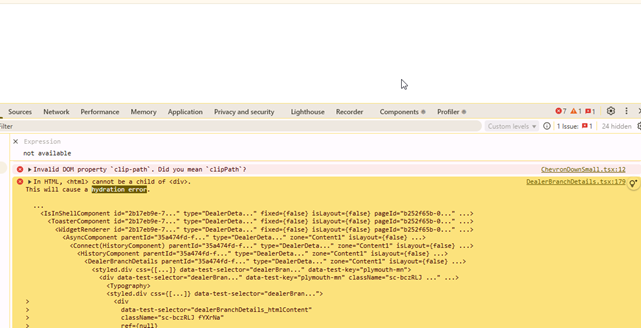
When using Optimizely Commerce Spire with React 18 or later, developers frequently encounter hydration issues—pages render blank or React shows hydration warnings. This typically occurs when the HTML rendered on the server does not match what React expects on the client.
This blog covers:
- Why hydration issues occur after upgrades
- The difference between CMS content and custom properties
- How to use parse, parserOptions, and transformContentHtml correctly
- Best practices for Spire projects
Why Hydration Issues Occur
React 18 introduced stricter hydration checks. Hydration is the process by which React attaches event listeners and state to server-rendered HTML. If the HTML structure differs between the server and the client, React logs warnings or hydration can fail completely.
In Optimizely:
- Existing content (created before the upgrade) may contain HTML structures such as <html>, <body>, and <title> tags.
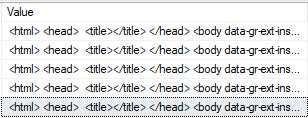
- After the upgrade, when you re-save the text in Optimizely Admin, these extra tags (<html>, <body>, <head>) are automatically removed.
Note: If you do not re-save manually, the old content will still retain these tags, resulting in inconsistent HTML between the server and the client.

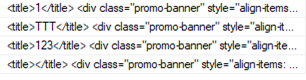
This mismatch causes blank pages or hydration warnings since React expects a consistent DOM structure.
CMS Content vs Custom Properties
Spire accepts HTML content from two main sources:
- CMS content: Standard pages and widgets from the CMS. These typically contain clean HTML fragments suitable for direct parsing.
- Custom properties: Data from the admin panel for Product, Category, Warehouse, Brand, and Location. These often include legacy HTML or encoded tags, which can cause mismatches during hydration.
Rule of thumb:
- CMS content → parse directly
- Custom properties → normalize first with transformContentHtml, then parse
Correct Rendering Approach
For CMS content
{parse(category.htmlContent, parserOptions)}
For custom properties
{parse(transformContentHtml(category.htmlContent), parserOptions)}
This ensures that CMS content is rendered as is, while custom property content is cleaned up before rendering.
Utility Functions Overview:
- transformContentHtml
- Import:
import transformContentHtml from "@insite/client-framework/Common
- Purpose:
- Detects full HTML documents and extracts <body> content.
- Encodes special characters where required.
- Normalizes legacy HTML so that it is safe and compatible with React hydration.
- Import:
- parse
- Library: html-react-parser
- Purpose:
- The parse function converts HTML strings into React elements.
- React cannot render raw HTML strings directly, so parsing into elements is the correct approach to display dynamic HTML content.
-
parserOptions
-
Import:
import { parserOptions } from "@insite/client-framework/Common - Purpose:
- Defines how HTML tags and attributes are transformed or sanitized during parsing.
- Removes unsafe attributes.
- Allows customization of tag and attribute replacements.
-
Best Practices
- If you only have 10–15 pages, re-save them in Optimizely Admin to remove outdated tags.
- Always choose the appropriate parsing strategy depending on the content source (CMS vs custom properties).
- Validate the content of custom properties before rendering to prevent inconsistent HTML and hydration issues.
Conclusion
- Mismatched HTML structures cause hydration problems in React 18 when using Optimizely Spire.
- For CMS content, use parse with parserOptions.
- For custom properties, normalize with transformContentHtml before calling parse.
- This approach avoids blank pages after upgrades and ensures reliable, accurate rendering in Spire projects.


Thank you for giving this mach information it was really nice
Before this i visited so many web sites compere all this it was really nice