If you spend your days building profitability and cost models, the August 2026 update to Oracle EPCM is worth a close read. The headline is a redesigned PCM Agent that finally lives where you actually work. But there are a couple of quieter improvements in this release that will matter just as much once you’re deep in a rule set.
The Enhanced PCM Agent
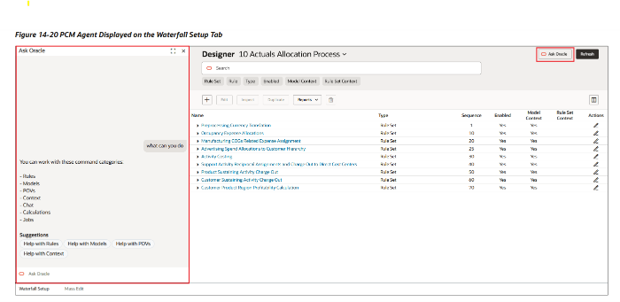
For anyone who has used the previous PCM Agent, the biggest shift in 26.08 isn’t that the assistant is smarter. It’s that it has moved. The redesigned agent is now embedded directly inside the modeling screens where the work happens: Models, the Waterfall Setup and Mass Edit tabs in Designer, and Calculation Control.
That location matters more than it sounds. Instead of breaking your flow to open a separate assistant, run a query, and then find your way back, you can describe what you want without leaving the screen. Create or adjust a model, edit a business rule, run a calculation, handle a POV operation, all in context.
The practical payoff is straightforward. Modeling cycles get faster because you’re describing changes rather than clicking through them. Newer analysts become productive sooner, which takes some pressure off the two or three people who currently hold most of the modeling knowledge. And you lose far less time to the small errors that creep every time you switch tools and lose your place.
There’s a timeline attached to this, and it’s worth putting on the calendar now:
- In 26.08, both the original and the enhanced agent are available. Use this window to test.
- In the October update (26.10), the original PCM Agent will be retired.
- Starting in 26.11, the Analyze Performance option on the Calculation Analysis page will only work through the new agent.
My advice is to treat 26.08 as an evaluation window rather than something to look at later. Put your real Waterfall and Mass Edit models in front of the enhanced agent now, while the original is still there as a fallback.
Where the Agent Earns its Keep
So, what do you actually reach for it to do? A few of the places I’d expect it to pay off first:
- Spinning up a new fiscal year by creating a full set of monthly POVs in one request, rather than building them one at a time.
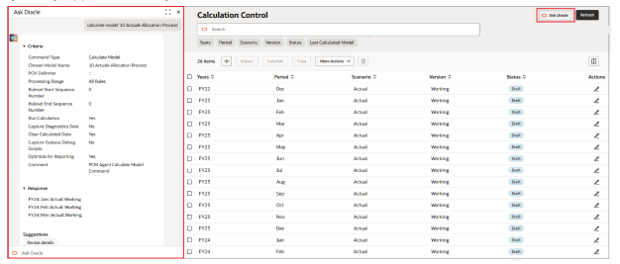
- Running a model calculation straight from Calculation Control, setting the options like run calculation, optimize for reporting, or clear calculated data, and reading the result inline.
- Drafting or adjusting a business rule from a plain-language description, then refining it conversationally as you build.
- Staging a what-if scenario quickly by copying or clearing POVs, running the model, and comparing the outcome.
- Getting oriented in an unfamiliar application, asking what a rule set does or which rules are enabled, which is genuinely useful for onboarding and knowledge transfer.
- Checking job status and recent calculation results without leaving the screen you’re working in.
- Clearing the repetitive housekeeping, resetting calculated data, re-running after a change, tidying up POVs, with a single request.
Creating Multiple POVs in One Request
This is a smaller feature, but it removes a genuinely tedious task. The agent can now create multiple POVs in a single request. Starting a forecast or planning scenario for a new fiscal year used to mean creating twelve POVs one-at-a-time. Now it’s a single ask. It’s the kind of change you don’t fully appreciate until the first time you don’t have to do it the old way.
Expanded Allocation Precision
The third change is easy to miss in the release notes, but it will land with anyone who has chased a stray remainder through a rule set. The value range for the Allocation Precision setting has been expanded to +12 and -12 decimal places.
If you run rules where a small source amount is spread across a large number of destinations, that extra precision keeps rule balancing more consistent and cuts down on the tiny remainders left behind after a rule runs, the ones that quietly distort the rules downstream of them. It’s a subtle setting, but it saves the kind of reconciliation headache that can cost you an afternoon.
Worth Noting for Administrators
One housekeeping item rounds out the release. The Application Diagnostics menu under Global Navigator’s Monitor area is being renamed to Application Monitoring, so don’t be thrown when the label changes.
My Take
Having built and supported cost models across a lot of clients over the years, what stands out to me about this release isn’t that Oracle added an AI assistant. It’s where they put it. Most of the friction in profitability work has never been the individual action; it’s the constant context-switching, and the fact that so much modeling knowledge ends up living in two or three people’s heads. Dropping a conversational assistant directly into Calculation Control, Waterfall Setup, and Mass Edit goes straight at both of those.
For the teams I work with, the value shows up in three places. It shortens the distance between knowing what you want a rule to do and having it done, which matters most during build and iteration. It lowers the barrier for newer analysts, so a junior resource can get oriented and handle routine tasks without waiting on a lead. And it takes the tedium out of the repetitive setup, creating POVs, clearing and re-running calculations, that quietly eats hours around every close.
I’d temper that with a dose of realism. The agent is an accelerator, not a replacement for solid solution design. It’s only ever as good as the model and rule structure underneath it, and conversational access to models and rules is something you want to govern deliberately rather than hand out by default. Treat it as a productivity layer on top of a well-built application, validate what it produces the way you’d review any change, and it becomes one of the more genuinely useful things to land in EPCM in a while.