
Deploying microservices in a cloud-native environment requires an efficient container orchestration platform and an automated CI/CD pipeline. Azure Kubernetes Service (AKS) is a Kubernetes solution that is managed by Azure. GitHub Actions makes it easy to automate your CI/CD processes from the source code repository.

Why Use GitHub Actions with AKS
Using GitHub Actions for AKS deployments provides:
- Automated and consistent deployments
- Faster release cycles
- Reduced manual intervention
- Easy Integration with GitHub repositories
- Better visibility into build and deployment status
Architecture Overview
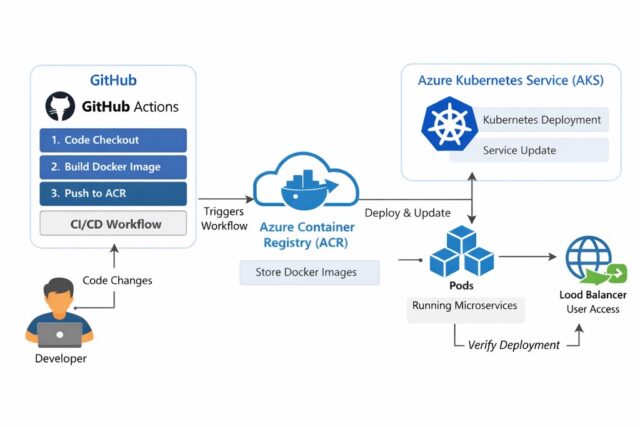
The deployment workflow follows a CI/CD approach:
- Microservices packaged as Docker images
- Images pushed to ACR
- AKS pulls the image from ACR
- GitHub Actions automates
- Build & Push Docker Images
- Deploy manifests to AKS
Prerequisites
Before proceeding with the implementation, ensure the following prerequisites are in place:
- Azure Subscriptions
- Azure CLI Installed and authenticated (AZ)
- An existing Azure Kubernetes Service (AKS) cluster
- Kubectl is installed and configured for your cluster
- Azure Container Registry (ACR) associated with the AKS cluster
- GitHub repository with microservices code
Repository Structure
Each microservice is maintained in a separate repository with the following structure: .github/workflows/name.yml
CI/CD Pipeline Stages Overview
- Source Code Checkout
- Build Docker Images
- Push images to ACR
- Authenticate to AKS
- Deploy Microservices using kubectl
Configure GitHub Secrets
Go to GitHub – repository – Settings – Secrets and Variables – Actions

Add the following secrets:
- ACR_LOGIN_SERVER
- ACR_USERNAME
- ACR_PASSWORD
- KUBECONFIG
Stage 1: Source Code Checkout
The Pipeline starts by pulling the latest code from the GitHub repository
Stage 2: Build Docker Images
For each microservice:
- A Docker image is built
- A unique tag (commit ID and version) is assigned
Images are prepared for deployment
Stage 3: Push Images to Azure Container Registry
Once the images are built:
- GitHub Actions authenticates to ACR
- Images are pushed securely to the registry
- After the initial setup, AKS subsequently pulls the images directly from ACR
Stage 4: Authenticate to AKS
GitHub Actions connects to the AKS cluster using kubeconfig
Stage 5: Deploy Microservices to AKS
In this stage:
- Kubernetes manifests are applied
- Services are exposed via the Load Balancer
Deployment Validation
After deployment:
- Pods are verified to be in a running state
- Check the service for external access
Best Practices
To make the pipeline production Ready:
- Use commit-based image tagging
- Separate environments (dev, stage, prod)
- Use namespace in AKS
- Store secrets securely using GitHub Secrets
Common Challenges and Solutions
- Image pull failures: Verify ACR permission
- Pipeline authentication errors: Validate Azure credentials
- Pod crashes: Review container logs and resource limits
Benefits of CI/CD with AKS and GitHub Actions
- Faster deployments
- Improved reliability
- Scalable microservices architecture
- Better developer productivity
- Reduced operational overhead
Conclusion
Deploying microservices on AKS using GitHub Actions provides a robust, scalable, and automated CI/CD solution. By integrating container builds, registry management, and Kubernetes deployments into a single pipeline, teams can deliver applications faster and more reliably.
CI/CD is not just about automation – it’s about confidence, consistency, and continuous improvement.