Introduction to Copilot for Power Platform
Microsoft Copilot is a revolutionary AI-powered tool for Power Platform, designed to streamline the development process and enhance the intelligence of your applications. This learning path will take you through the fundamentals of Copilot and its integration with Power Apps, Power Automate, Power Virtual Agents, and AI Builder.
Copilot in Microsoft Power Platform helps app makers quickly solve business problems. A copilot is an AI assistant that can help you perform tasks and obtain information. You interact with a copilot by using a chat experience. Microsoft has added copilots across the different Microsoft products to help users be more productive. Copilots can be generic, such as Microsoft Copilot, and not tied to a specific Microsoft product. Alternatively, a copilot can be context-aware and tailored to the Microsoft product or application that you’re using at the time.
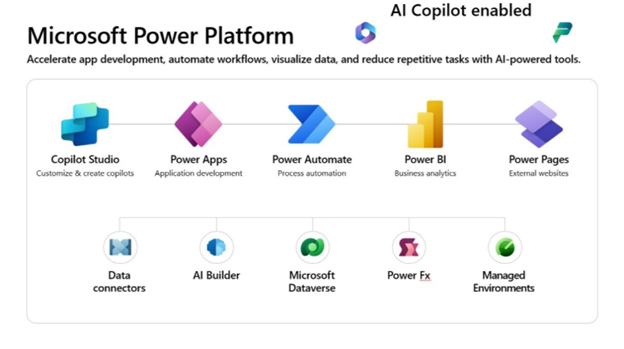
Microsoft Power Platform Copilots & Specializations.
Microsoft Power Platform has several copilots that are available to makers and users.
Microsoft Copilot for Microsoft Power Apps
Use this copilot to help create a canvas app directly from your ideas. Give the copilot a natural language description, such as “I need an app to track my customer feedback.” Afterward, the copilot offers a data structure for you to iterate until it’s exactly what you need, and then it creates pages of a canvas app for you to work with that data. You can edit this information along the way. Additionally, this copilot helps you edit the canvas app after you create it. Power Apps also offers copilot controls for users to interact with Power Apps data, including copilots for canvas apps and model-driven apps.
Microsoft Copilot for Microsoft Power Automate
Use this copilot to create automation that communicates with connectors and improves business outcomes. This copilot can work with cloud flows and desktop flows. Copilot for Power Automate can help you build automation by explaining actions, adding actions, replacing actions, and answering questions.
Microsoft Copilot for Microsoft Power Pages
Use this copilot to describe and create an external-facing website with Microsoft Power Pages. As a result, you have theming options, standard pages to include, and AI-generated stock images and relevant text descriptions for the website that you’re building. You can edit this information as you build your Power Pages website.
How Copilots Work
You can create a copilot by using a language model, which is like a computer program that can understand and generate human-like language. A language model can perform various natural language processing tasks based on a deep-learning algorithm. The massive amounts of data that the language model processes can help the copilot recognize, translate, predict, or generate text and other types of content.
Despite being trained on a massive amount of data, the language model doesn’t contain information about your specific use case, such as the steps in a Power Automate flow that you’re editing. The copilot shares this information for the system to use when it interacts with the language model to answer your questions. This context is commonly referred to as grounding data. Grounding data is use case-specific data that helps the language model perform better for a specific topic. Additionally, grounding data ensures that your data and IP are never part of training the language model.
Accelerate Solution Building with Copilot
Consider the various copilots in Microsoft Power Platform as specialized assistants that can help you become more productive. Copilot can help you accelerate solution building in the following ways:
- Prototyping
- Inspiration
- Help with completing tasks
- Learning about something
Prototyping
Prototyping is a way of taking an idea that you discussed with others or drew on a whiteboard and building it in a way that helps someone understand the concept better. You can also use prototyping to validate that an idea is possible. For some people, having access to your app or website can help them become a supporter of your vision, even if the app or website doesn’t have all the features that they want.
Inspiration
Building on the prototyping example, you might need inspiration on how to evolve the basic prototype that you initially proposed. You can ask Copilot for inspiration on how to handle the approval of which ideas to prioritize. Therefore, you might ask Copilot, “How could we handle approval?”
Help with Completing Tasks
By using a copilot to assist in your solution building in Microsoft Power Platform, you can complete more complex tasks in less time than if you do them manually. Copilot can also help you complete small, tedious tasks, such as changing the color of all buttons in an app.
Learn about Something
While building an app, flow, or website, you can open a browser and use your favorite search engine to look up something that you’re trying to figure out. With Copilot, you can learn without leaving the designer. For example, your Power Automate flow has a step to List Rows from Dataverse, and you want to find out how to check if rows are retrieved. You could ask Copilot, “How can I check if any rows were returned from the List rows step?”
Knowing the context of your flow, Copilot would respond accordingly.
Design and Plan with Copilot
Copilot can be a powerful way to accelerate your solution-building. However, it’s the maker’s responsibility to know how to interact with it. That interaction includes writing prompts to get the desired results and evaluating the results that Copilot provides.
Consider the Design First
While asking Copilot to “Help me automate my company to run more efficiently” seems ideal, that prompt is unlikely to produce useful results from Microsoft Power Platform Copilots.
Consider the following example, where you want to automate the approval of intake requests. Without significant design thinking, you might use the following prompt with Copilot for Power Automate.
Copilot in cloud flow
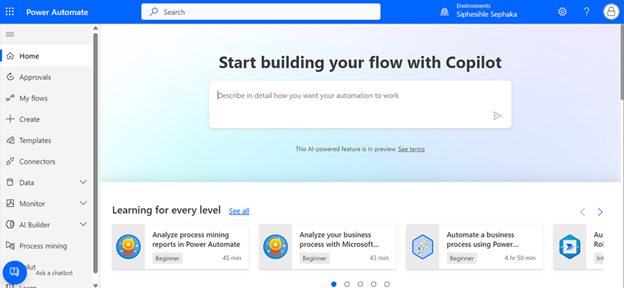
“Create an approval flow for intake requests and notify the requestor of the result.”
This prompt produces the following suggested cloud flow.
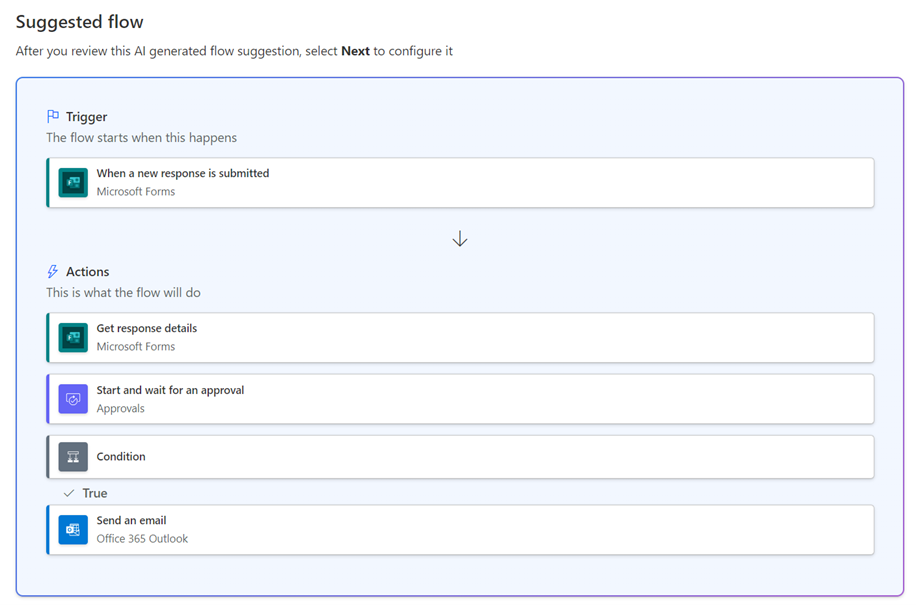
While the prompt is an acceptable start, you should consider more details that can help you create a prompt that might get you closer to the desired flow.
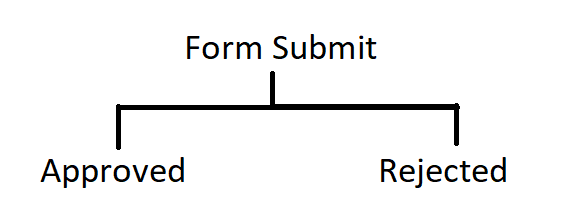
A good way to improve your success is to spend a few minutes on a whiteboard or other visual design tool, drawing out the business process.
Include the Correct Ingredients in the Prompt
A prompt should include as much relevant information as possible. Each prompt should include your intended goal, context, source, and outcome.
When you’re starting to build something with Microsoft Power Platform copilots, the first prompt that you use sets up the initial resource. For Power Apps, this first prompt is to build a table and an app. For Power Automate, this first prompt is to set up the trigger and the initial steps. For Power Pages, this first prompt sets up the website.
Consider the previous example and the sequence of steps in the sample drawing. You might modify your initial prompt to be similar to the following example.
“When I receive a response to my Intake Request form, start and wait for a new approval. If approved, notify the requestor saying so and also notify them if the approval is denied.”
Continue the Conversation
You can iterate with your copilot. After you establish the context, Copilot remembers it.
The key to starting to build an idea with Copilot is to consider how much to include with the first prompt and how much to refine and add after you set up the resource. Knowing this key consideration is helpful because you don’t need to get a perfect first prompt, only one that builds the idea. Then, you can refine the idea interactively with Copilot.
6 Unique Copilot Features in Power Platform
-
Natural Language Power FX Formulas in Power Apps
Copilot enables developers to write Power FX formulas using natural language. For instance, typing /subtract datepicker1 from datepicker2 in a label control prompts Copilot to generate the corresponding formula, such as DateDiff(DatePicker1. SelectedDate, DatePicker2. SelectedDate, Days). This feature simplifies formula creation, especially for those less familiar with coding.
-
AI-Powered Document Analysis with AI Builder
By integrating Copilot with AI Builder, users can automate the extraction of data from documents, such as invoices or approval forms. For example, Copilot can extract approval justifications and auto-generate emails for swift approvals within Outlook. This process streamlines workflows and reduces manual data entry.
-
Automated Flow Creation in Power Automate
Copilot assists users in creating automated workflows by interpreting natural language prompts. For example, a user can instruct Copilot to “Create a flow that sends an email when a new item is added to SharePoint,” and Copilot will generate the corresponding flow. This feature accelerates the automation process without requiring extensive coding knowledge.
-
Conversational App Development in Power Apps Studio
In Power Apps Studio, Copilot allows developers to build and edit apps using natural language commands. For instance, typing “Add a button to my header” or “Change my container to align center” enables Copilot to execute these changes, simplifying the development process and making it more accessible.
-
Generative Topic Creation in Power Virtual Agents
Copilot facilitates the creation of conversation topics in Power Virtual Agents by generating them from natural language descriptions. For example, describing a topic like “Customer Support” prompts Copilot to create a topic with relevant trigger phrases and nodes, streamlining the bot development process.
-
AI-Driven Website Creation in Power Pages
Copilot assists in building websites by interpreting natural language descriptions. For example, stating “Create a homepage with a contact form and a product gallery” prompts Copilot to generate the corresponding layout and components, expediting the website development process.
Limitations of Copilot
| Limitation | Description | Example |
|---|---|---|
| 1. Limited business context | Does not understand specific business rules | Missing multi-level approval |
| 2. Restricted connectors | Only accesses connected data sources | Cannot query unconnected DB |
| 3. Not fully customizable | May not get exact layout or logic | Needs manual field grouping |
| 4. Model hallucination | May guess incorrectly | Writes nonexistent filter |
| 5. Language limitations | Best in English | Misinterprets non-English |
| 6. Needs clean data | Struggles with unclear names | fld001 vs Status |
| 7. Security gaps | May ignore role-based security | No row-level security |
| 8. No complex logic | Limited branching/looping | Cannot do 3-level approval |
| 9. Limited offline | Assumes online | No offline sync |
| 10. Microsoft only | No 3rd-party AI | Cannot use Google Cloud |
Build Good Prompts
Knowing how to best interact with the copilot can help get your desired results quickly. When you’re communicating with the copilot, make sure that you’re as clear as you can be with your goals. Review the following dos and don’ts to help guide you to a more successful copilot-building experience.
Do’s of Prompt-Building
To have a more successful copilot building experience, do the following:
- Be clear and specific.
- Keep it conversational.
- Give examples.
- Check for accuracy.
- Provide contextual details.
- Be polite.
Don’ts of Prompt-Building
- Be vague.
- Give conflicting instructions.
- Request inappropriate or unethical tasks or information.
- Interrupt or quickly change topics.
- Use slang or jargon.
Conclusion
Copilot in Microsoft Power Platform marks a major step forward in making low-code development truly accessible and intelligent. By enabling users to build apps, automate workflows, analyze data, and create bots using natural language, it empowers both technical and non-technical users to turn ideas into solutions faster than ever.
It transforms how people interact with technology by:
- Accelerating solution creation
- Lowering technical barriers
- Enhancing productivity and innovation
With built-in security, compliance with organizational governance, and continuous improvements from Microsoft’s AI advancements, Copilot is not just a tool—it’s a catalyst for transforming how organizations solve problems and deliver value.
As AI continues to evolve, Copilot will play a central role in democratizing software development and helping organizations move faster and smarter with data-driven, automated tools.