It’s an exciting time to be in the digital marketing space. The rise of agentic AI means that you can deliver targeted, relevant content faster than ever before. However, with this growth also comes pressure to move quickly when selecting a content platform. You can generate all of this content, but where are you going to store it, and how are you going to deliver it?
Adobe Experience Manager continues to lead the enterprise content management space, combining proven enterprise-grade tooling with flexible delivery, powerful extensibility, and dependable performance. But leadership doesn’t stand still. Building on a 20-year foundation, newer Adobe Experience Manager offerings introduce more flexible and scalable approaches to content management. Adobe has been working diligently on a new delivery architecture that leverages edge-based scaling and recommends serverless edge workers in place of application servers and services. This solution is called Edge Delivery Services (EDS).
“Wait, I thought EDS was document authoring?”
Not necessarily. The important thing to understand about Edge Delivery Services is that, as its name suggests, the solution is primarily a change in the content delivery tier. That in turn, once you adopt it, you’re faced with a new set of decisions to make about where you want to store the content and which UI you want to use to author it.
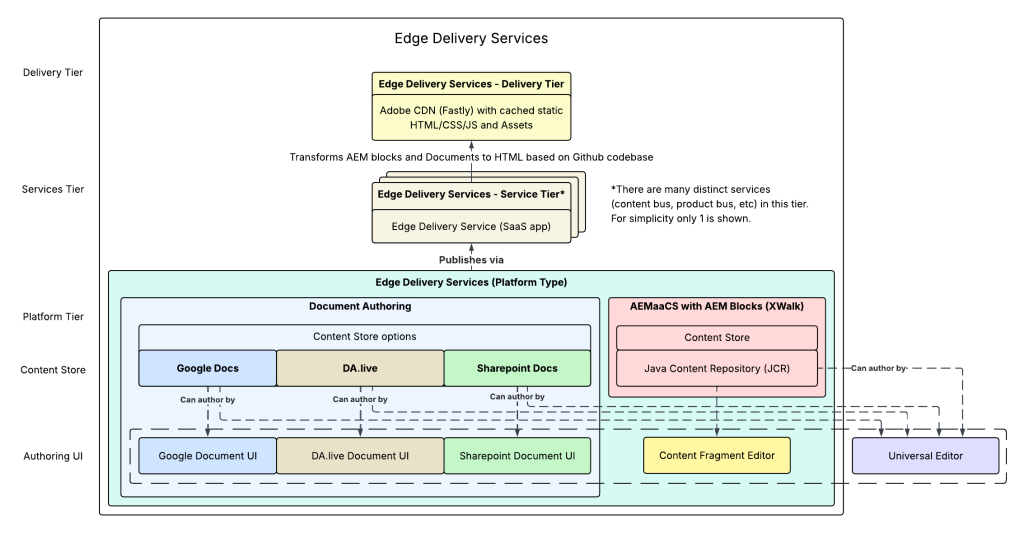
When you move to EDS, you always have the same Delivery and Services tiers but the tiers that come before are flexible. When we talk about the Platform tier, there are two primary content store and management options.
- Document Authoring
This newer approach can use Adobe’s DA.live product, Google Docs, or Sharepoint as a content store. (You may recognize DA.live by its previous names — Dark Alley, Project Franklin, or Project Helix.) - AEM as a Cloud Service (XWalk)
When AEMaaCS is used in EDS, it’s called AEM XWalk (crosswalk). It continues to have all of the content storage and management benefits of AEM as a Cloud Service, but the content is delivered quite differently. Instead of the traditional approach where web requests come to the AEM Publish instance via Apache Sling, Adobe’s Edge Delivery Service constructs a traditional HTML hierarchy and serves it at the CDN. There’s no more Sling resource mapping and page compilation at the time of an end user’s request.
Now, to further paint this picture, I think it’s helpful to compare pieces of the classic AEM headful stack and their equivalent headful options in the Edge Delivery Services model.
| Stack Capability | Headful AEM | EDS – XWalk | EDS – Document Authoring |
| Content Store | Java Content Repository | Java Content Repository | DA.live, Google Docs, or Sharepoint. Hierarchical document structure. |
| Data Models | Sling Models | Block model json | Block model json + Javascript + CSS |
| Rendering | HTL Scripts + Javascript + CSS | Block model json + Javascript + CSS | Block model json + Javascript + CSS |
| Component-level Authoring | AEM Touch UI Dialog XML | Universal Editor authoring panel. Uses AEM Blocks json definitions. | DA.live document authoring, Google Docs, Sharepoint docs, OR Universal Editor. All use AEM Blocks json definitions. |
| Page Editing | AEM Page Editor | Universal Editor | DA.live document authoring, Google Docs, Sharepoint docs, OR Universal Editor. |
| Page Management | AEM Sites Admin | AEM Sites Admin | DA.live document folders, Google Docs folders, Sharepoint folders. |
| Delivery Tier | Publish server + Dispatcher + CDN | CDN for content HTML. Product bus or edge workers for data. | CDN for content HTML. Product bus or edge workers for data. |
| Routing | Dispatcher + Apache Sling | CDN | CDN |
| Caching | Dispatcher + CDN | CDN | CDN |
As Adobe has moved to a more decoupled architecture, you may have noticed that the number of options per stack capability has also grown. This is important as selecting a platform type forces you into a set of content stores, which then forces you into a set of compatible authoring UIs.
Before you do anything else, you need to decide if you want a Headful or Headless AEM implementation. If you’re not sure how to decide, I recommend my previous blog on the topic.
One important amendment based on insights from Adobe Summit is that Adobe is making a large investment in agentic AI and tooling for the experience layer. While choosing headless will decouple the CMS from the presentation layer and have a higher degree of freedom, you’re also limiting Adobe’s ability to add value at the presentation layer. New presentation-layer features and agents will only work in a headful experience.
With user-driven web experiences on the horizon, this is an increasingly important consideration. You may ultimately find it more valuable to cater to user interests with adaptable, personalized experience rendering than stick with traditional business-driven experiences.
Once you’ve made the Headful vs Headless call, the next set of capability decisions becomes clearer.
Headful Decisions
If you decide on a headful approach, you’re implicitly picking EDS. From there you decide between XWalk or Document Authoring as the content source. While the exact pros and cons of each solution are beyond the scope of this blog post, I will offer a few light comparisons.
1. XWalk utilizes all of the existing AEM content management tooling, security, workflows, WYSIWYG authoring, and content policy controls.
2. Document Authoring focuses on author empowerment in the document-style authoring that most users already understand.
Decision – Headful with XWalk
If you decide on XWalk, the AEMaaCS Java Content Repository will be your primary content authoring store, just like in a traditional AEMaaCS implementation. The AEM Sites Admin will continue to manage your page content. What changes is the following:
- You will need to utilize AEM blocks instead of Touch UI components
- Universal Editor will be your primary component and page editor.
Decision – Headful with Document Authoring
If you decide on Document Authoring, you have several choices for a primary content authoring store. I highly recommend DA.live as the primary source as it contains CMS tooling, though you may have existing documents in Google Docs and Sharepoint you want to integrate. Document Authoring implementations require AEM blocks. Then you have a choice about how your authors edit content:
- Edit directly in the Document UI.
- Edit in Universal Editor for a more WYSIWYG experience.
Headless Decisions
If you decide on a headless approach, you have a different series of decisions to make. Both the AEMaaCS JCR and Document Authoring can be a headless content store. As I said earlier, the exact pros and cons of each headless solution are beyond the scope of this blog post, so let’s focus on the subsequent decisions.
Decision – Headless with AEMaaCS
If you decide to use AEMaaCS, do you utilize:
- Content fragments
- Page-based resources
- Both?
I covered these pros and cons in my last blog post. If you use page-based resources, you will always use the Universal Editor as the authoring UI. If you use content fragments, you will use the content fragment editor and optionally the Universal Editor if you want WYSWYG-style authoring.
Now, there’s one caveat with AEMaaCS to be aware of. If you use page-based resources, as of mid-2026, there is no OOTB schema definition available for AEM Blocks (EDS-style components). If you want small headless payloads, you will have to utilize classic Sling Models as described in my last blog post or develop a custom solution.
Decision – Headless with Document Authoring
If you decide on a headless approach with Document Authoring, I would highly encourage you to use DA.live (Adobe’s Document Authoring product) and not Google or Sharepoint. In a headless use case, you need a schema-based JSON export. Of the previously mentioned document stores, only DA.live offers that out of the box. Document Authoring implementations require AEM blocks implementations. Then you have a choice to make about how your authors edit content. You can have them edit directly in the document view or utilize the Universal Editor for a more WYSIWYG experience.
Wrap-up
With an increasingly decoupled AEM architecture, there are more options than ever before to meet the needs of your organization. Still need help deciding? Be on the lookout for a future blog post that walks through the paradigm shift that is Document Authoring. Or reach out directly! For more information on how Perficient can implement your dream digital experiences, we’d love to hear from you. We’re certified by Adobe for our proven capabilities, and we hold an Adobe Experience Manager specialization (among others).