
Claude Skills for business analysis and automation. ElevenLabs voice agents for sales and customer engagement.
How to Read This
The two tools here solve opposite halves of the same problem. Claude Skills is about consistency on internal work: teaching AI your team’s process once so it follows it every time, instead of re-explaining the format in every conversation. ElevenLabs voice agents are about scale on external conversations: handling customer calls in Indian languages at a volume no call centre could staff.
As with the earlier briefings, each section shows what the tool looks like in use, explains what it does, and walks through two concrete scenarios. The visuals are illustrative diagrams of how each tool works, drawn for this document.
1. Claude Skills — Teaching AI How Your Team Works
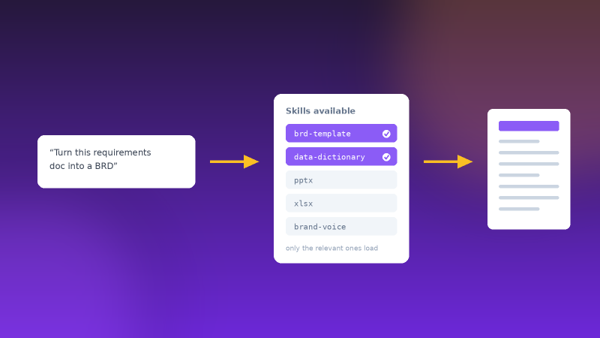
Most people using AI at work hit the same wall: the output is good, but it’s never quite in the shape their organisation needs. So, every conversation starts with the same paragraph of instructions — use this template, follow this naming convention, include these sections, match this tone. Claude Skills removes that repetition.
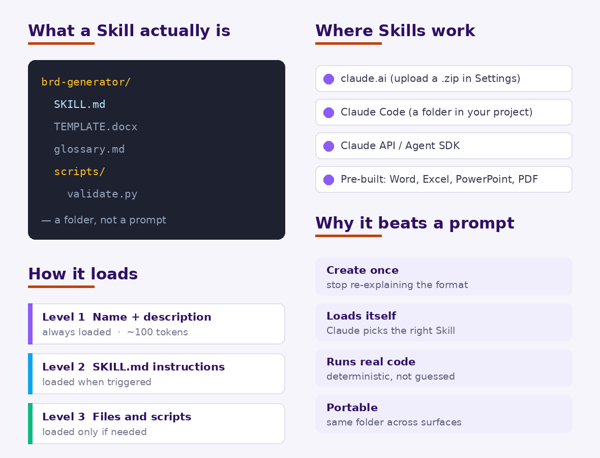
A Skill is a folder containing instructions, reference material, and optionally executable scripts, that Claude loads automatically when a task matches. Rather than a prompt you paste each time, it’s a reusable package of how a particular job gets done. Anthropic ships pre-built Skills for Word, Excel, PowerPoint and PDF, and you can create your own — no coding required for simple ones, just a Markdown file describing the process.
The design detail that makes this practical is progressive disclosure. Claude only holds each Skill’s name and description in memory (roughly 100 tokens each), so you can install many without slowing anything down. The full instructions load only when a Skill is triggered, and bundled files and scripts load only if that specific task needs them.
What a Skill Is and How It Loads
Key Features
- Reusable: write the process once; Claude applies it automatically in every future conversation that matches.
- Self-selecting: you don’t invoke a Skill by name — Claude matches your request against each Skill’s description and loads what fits.
- Composable: multiple Skills stack on one task, so a “BRD template” Skill and a “data dictionary” Skill can work together.
- Can run real code: a Skill can bundle scripts, so validation and calculation are done deterministically rather than generated as text.
- Portable across surfaces: the same SKILL.md folder works in claude.ai, Claude Code, and the API — though it must be uploaded to each surface separately.
- Pre-built document Skills: Word, Excel, PowerPoint, and PDF Skills are available with no setup.
Use Case in Practice
| EXAMPLE 1
A BRD that comes out in the house format every time → Today: every business requirement document starts by pasting the template, the section order, and the glossary into the chat, and the output still drifts. → Build a Skill folder: SKILL.md describing how your team writes a BRD, the blank template file, and your domain glossary. → Upload it once in Settings. From then on, “turn these meeting notes into a BRD” produces a document in your format, using your terminology. → Share the folder with the team so every analyst produces a consistent document, not their own interpretation of one. Result: Institutional knowledge that lived in one senior analyst’s head becomes something the whole team applies automatically. |
| EXAMPLE 2
Automating a recurring reporting job end to end → Every sprint someone exports raw data, cleans it the same way, applies the same rules, and formats the same status report. → Capture that as a Skill: the cleaning rules in SKILL.md, a validation script in scripts/, and the report template alongside it. → Hand Claude the raw export and ask for the report. It follows the rules, runs the validation script rather than eyeballing the numbers, and fills the template. → When the rules change, update the Skill once instead of re-training everyone who runs the report. Result: A recurring half-day of manual work becomes a request, with the error-prone steps handled by code rather than judgment. |
Worth knowing: on claude.ai, custom Skills are uploaded per user and aren’t centrally managed by admins, so team-wide rollout means sharing the folder rather than pushing it out. And because a Skill can run code, only install Skills you wrote or got from a trusted source — treat it like installing software, not like pasting a prompt.
2. ElevenLabs Voice Agents — Customer Conversations at Scale
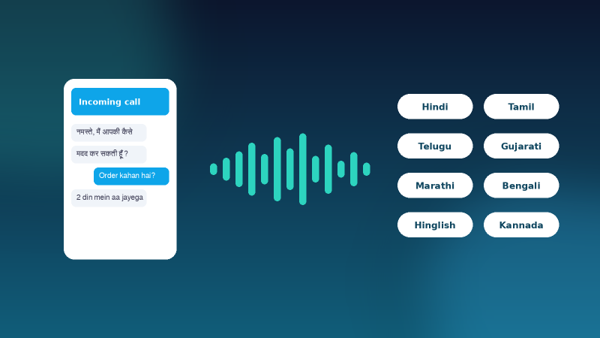
ElevenLabs positions itself as a full-stack voice AI platform for Indian enterprises, with the pitch being the ability to run millions of real-time customer conversations across Indian languages at very low latency without giving up trust or compliance. The relevant claim for a sales or support team is not that AI can speak — it’s that it can hold a natural phone conversation, in the customer’s language, at a volume that headcount can’t match.
What makes it work in the Indian market specifically is handling how people speak. The voice models are tuned for Indian accents and code-switched speech, so a caller who starts in Hindi and slips into English mid-sentence is still understood — and the models are built to hold up in noisy, real-world call conditions rather than clean studio audio. The voice library runs to 10,000+ voices, including 12 Indian languages and accents.
The Two Platforms
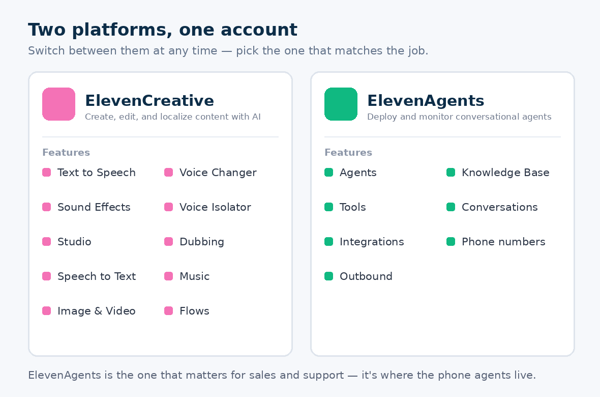
On signing in you choose a platform, and you can switch at any time. ElevenCreative covers content production — text to speech, dubbing, voice cloning, music, and video. ElevenAgents is the one relevant to sales and customer engagement: it’s where conversational agents are built, connected to a knowledge base and tools, given phone numbers, and monitored.
Key Features
- Conversational agent orchestration: low-latency agents across voice and chat, with guardrails, escalation logic, and handoff to a human when needed.
- Indian telephony integration: connects to providers including Ozonetel, Exotel and Plivo for real-time inbound and outbound calling and routing.
- Knowledge base grounding: agents answer from your own documented policies and product information rather than improvising.
- Voice library and cloning: choose from a large library or create a consistent brand voice for every customer touchpoint.
- Compliance and residency: India data residency options and enterprise governance controls, aimed at regulated industries.
- Deployment support: forward-deployed engineering support to get agents working in live production rather than just in a demo.
Use Case in Practice
| EXAMPLE 1
Order status calls that never reach a human → A large share of inbound calls are the same question: where is my order, and when will it arrive. → Build an agent in ElevenAgents, connect it to the order system as a tool and to the returns policy as a knowledge base. → Attach a phone number through the telephony integration. The agent answers in the caller’s language, looks up the real order, and gives a real answer. → Set escalation rules so anything involving a complaint, a refund dispute, or an unclear request routes to a human with the context attached. Result: Routine volume gets absorbed automatically, and the human team spends its time on the calls that actually need judgment. |
| EXAMPLE 2
Outbound follow-up on leads that currently go cold → Hundreds of enquiries come in weekly; the sales team can only call a fraction, so the rest go stale. → Configure an outbound agent to make the first-touch call in the language the lead enquired in, confirm interest, and answer basic product questions. → Genuinely interested leads are transferred live to a salesperson or booked into a calendar slot; the rest are logged with a reason. → Review transcripts in the Conversations view to see which objections recur, and feed that back into both the agent and the human script. Result: Every lead gets contacted quickly, and the sales team spends its calls on people who have already said yes to a conversation. |
Worth knowing: voice agents touch regulated ground. Disclosure that the caller is speaking to an AI, consent and call-recording rules, and data residency all need answering before a pilot goes live, not after. These are also exactly the areas ElevenLabs markets its enterprise controls around, so they’re a fair thing to press on during evaluation.
Where Each Tool Fits
A quick reference for deciding which of the two a given problem belongs to.
| AI output never matches our document format | Claude Skills |
| The same instructions get pasted into every chat | Claude Skills |
| A recurring analysis or report eats hours each cycle | Claude Skills |
| Process knowledge sits with one or two people | Claude Skills |
| Inbound call volume is higher than we can staff | ElevenLabs voice agents |
| Customers call in several Indian languages | ElevenLabs voice agents |
| Leads go cold before anyone calls them back | ElevenLabs voice agents |
Closing Thought
These two tools point at the same underlying shift from different directions. Claude Skills captures how work is done so it can be repeated without the person who knows it.
Voice agents capture a conversation pattern so it can be held without the person who usually holds it.
In both cases the value isn’t replacing people — it’s that the parts of the job that were purely procedural stop consuming the hours that should go to the parts that aren’t.