
What is MCP?
Model Context Protocol (MCP) is an open-source standard for integrating AI applications to external systems. With AI use cases getting traction more and more, it becomes evident that AI applications tend to connect to multiple data sources to provide intelligent and relevant responses.
Earlier AI systems interacted with users through Large language Models (LLM) that leveraged pre-trained datasets. Then, in larger organizations, business users work with AI applications/agents expect more relevant responses from enterprise dataset, from where Retrieval Augmented Generation (RAG) came into play.
Now, AI applications/agents are expected to produce more accurate responses leveraging latest data, that requires AI systems to interact with multiple data sources and fetch accurate information. When multi-system interactions are established, it requires the communication protocol to be more standardized and scalable. That is where MCP enables a standardized way to connect AI applications to external systems.
Architecture
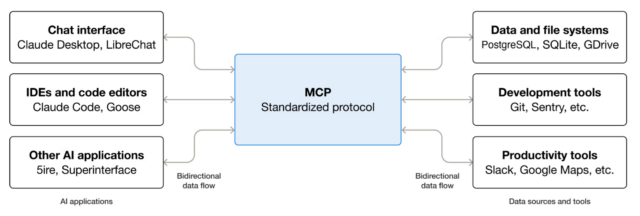
Using MCP, AI applications can connect to data source (ex; local files, databases), tools and workflows – enabling them to access key information and perform tasks. In enterprises scenario, AI applications/agents can connect to multiple databases across organization, empowering users to analyze data using natural language chat.
Benefits of MCP
MCP serves a wide range of benefits
- Development: MCP reduces development time and complexity when building, or integrating with AI application/agent. It makes integrating MCP host with multiple MCP servers simple by leveraging built-in capability discovery feature.
- AI applications or agents: MCP provides access to an ecosystem of data sources, tools and apps which will enhance capabilities and improve the end-user experience.
- End-users: MCP results in more capable AI applications or agents which can access your data and take actions on user behalf when necessary.
MCP – Concepts
At the top level of MCP concepts, there are three entities,
- Participants
- Layers
- Data Layer Protocol
Participants
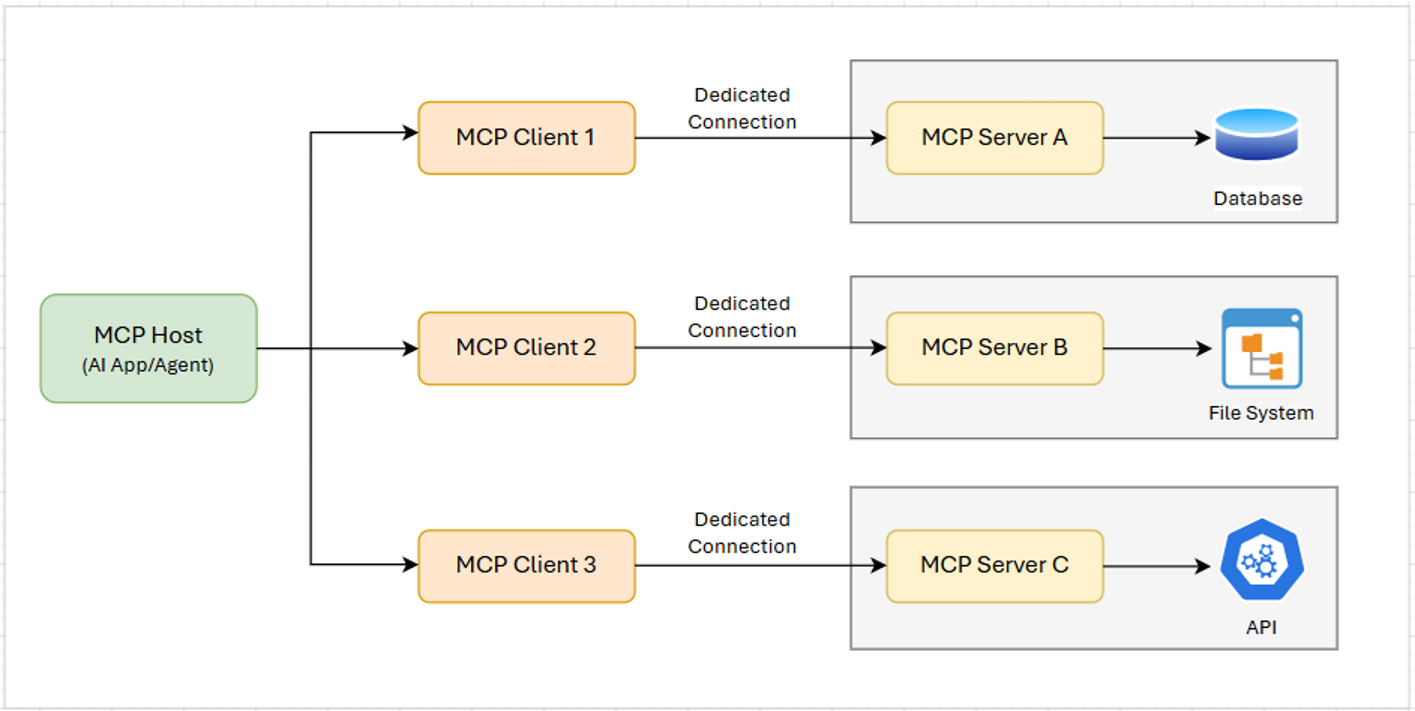
MCP follows a client-server architecture where an MCP host – an AI application like enterprise chatbot establishes connections to one or more MCP servers. The MCP host accomplishes this by creating a MCP client for each MCP server. Each MCP client maintains a dedicated connection with its MCP server.
The key participants of MCP architecture are:
- MCP Host: AI application that coordinates and manages one or more MCP clients
- MCP Client: A component that maintains a dedicated connection to an MCP server and obtains context from an MCP server for MCP host to interact
- MCP Server: A program that provides context to MCP clients (i.e. generate responses or perform actions on user behalf)
Layers
MCP consists of two layers:
- Data layer – Defines JSON-RPC based protocol for client-server communication including,
- lifecycle management – initiate connection, capability discovery & negotiation, connection termination
- Core primitives – enabling server features like tools for AI actions, resources for context data, prompt templates for client-server interaction and client features like ask client to sample from host LLM, log messages to client
- Utility features – Additional capabilities like real-time notifications, track progress for long-running operations
- Transport Layer – Manages communication channels and authentication between clients and servers. It handles connection establishment, message framing and secure communication between MCP participants
Data Layer Protocol
The core part of MCP is defining the schema and semantics between MCP clients and MCP servers. It is the part of MCP that defines the ways developers can share context from MCP servers to MCP clients.
MCP uses JSON-RPC 2.0 as its underlying RPC protocol. Client and servers send requests to each other and respond accordingly. Notifications can be used when no response is required.
Life Cycle Management
MCP is a stateful protocol that requires lifecycle management. The purpose of lifecycle management is to negotiate the capabilities (i.e. functionalities) that both client and server support.
Primitives
Primitives define what clients and servers can offer each other. These primitives specify the types of contextual information that can be shared with AI applications and the range of actions that can be performed. MCP defines three core primitives that servers can expose:
- Tools: Executable functions that AI applications can invoke to perform actions (e.g., API calls, database queries)
- Resources: Data sources that provide contextual information to AI applications (e.g., file contents, API responses, database records)
- Prompts: Reusable templates that help structure interactions with language models (e.g., system prompts, few-shot examples)
Notifications
The protocol supports real-time notifications to enable dynamic updates between servers and clients. For example, when a server’s available tools change – such as when new functionalities are added or existing functionality is updated – the server can send tool update notifications to all its connected clients about these changes.
Security in Data Accessing
While AI applications communicate with multiple enterprise data sources thgrouch MCP and fetch real-time sensitive data like customer information, financial data to serve the users, data security becomes absolutely critical factor to be addressed.
MCP ensures secure access.
Authentication and Authorization
MCP implements server-side authentication where each MCP server validates who is making the request. The enterprise system controls access through:
- User-specific credentials – Each user connecting through MCP has their own authentication tokens
- Role-based access control (RBAC) – Users only access data that the role permits
- Session management – Time-limited sessions that expire automatically
Data Access Controls
MCP server acts as a security gateway that enforces the same access policies as direct system access:
-
- Users can only query data that they are authroized to access
- The server validates every request against permission rules
- Sensitive information can be masked or filtered based on user privileges
Secure Communication
-
-
- Encrypted connections – All data transmissions uses TLS/HTTPS encryption
- No data storage in AI – AI systems do not store the financial data it accesses; it only process it during the conversation session
-
Audit and Monitoring
MCP implementations in enterprise ecosystem should include:
-
-
- Complete audit logs – Every data access request is logged with user, timestamp and data accessed
- Anomaly detection – Engage mechanisms that monitor unusual access patterns and trigger alerts
- Compliance tracking – All interactions meet regulatory requirements like GDPR, PCI-DSS
-
Architecture Isolation
Enterprises typically deploy MCP using:
-
-
- Private network deployment – MCP servers stay within the enterprise secure firewall boundary
- API gateway integration – Requests go through existing security infrastructure
- No direct database access – MCP connects and access data through secure APIs, not direct access to database
-
The main idea is that MCP does not bypass existing security. It works within the same security as other enterprise applications, just showing a smarter interface.

MCP Implementation & Demonstration
In this section, I will demonstrate a simple use case where MCP client (Claude Desktop) interacts with “Finance Manager” MCP server that can fetch financial information from the database.
Financial data is maintained in Postgres database tables. MCP client (Claude Desktop app) will request information about customer account, MCP host will discover appropriate capability based on user prompt and invoke respective MCP tool function that can fetch data from the database table.
To make MCP client-server in action, there are three parts to be configured
-
-
- Backend Database
- MCP server implementation
- MCP server registration in MCP Host
-
Backend Database
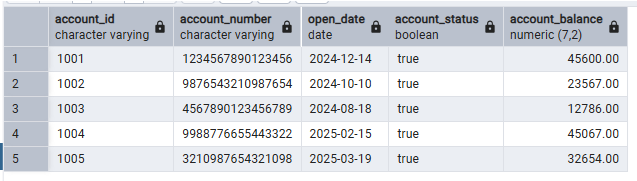
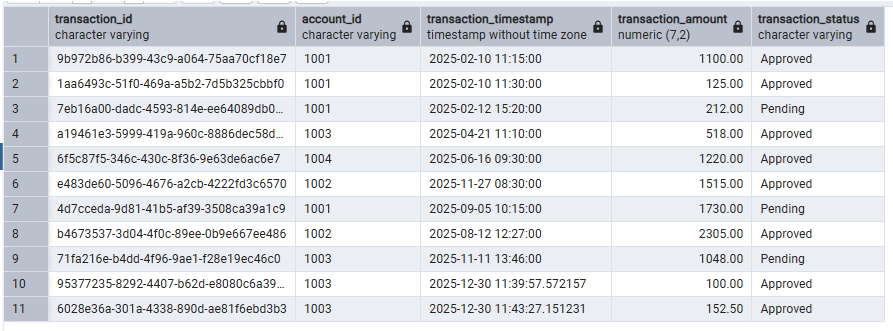
Postgres table “accounts” maintains accounts data with below information, “transactions” table maintains the transaction performed on the accounts
MCP server implementation
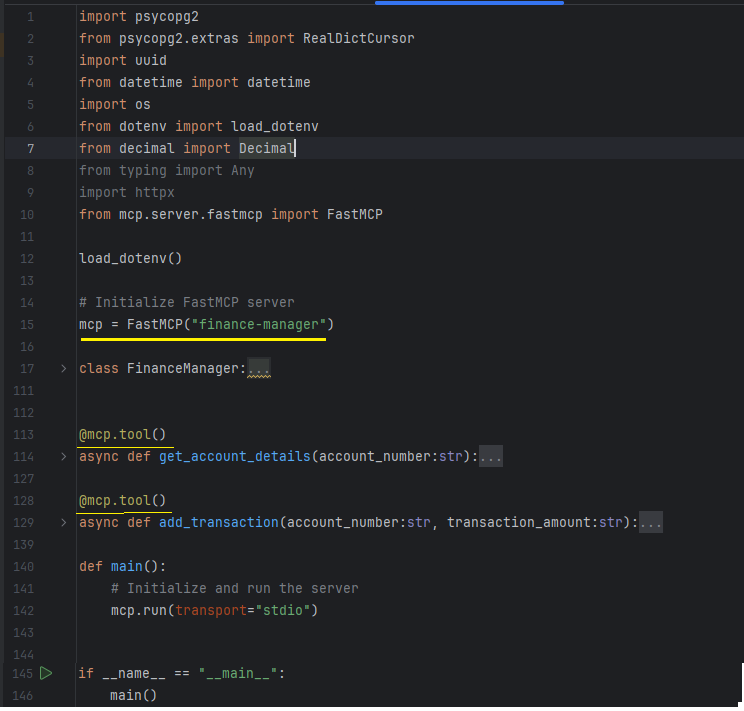
FastMCP class implements MCP server components and creating an object of it initialize and enables access to those components to create enterprise MCP server capabilities.
The annotation “@mcp.tool()” defines the capability and the respective function will be recognized as MCP capability. These functions will be exposed to AI applications and will be invoked from MCP Host to perform designated actions.
In order to invoke MCP capabilities from client, MCP server should be up & running. In this example, there are two functions defined as MCP tool capabilities,
-
-
- get_account_details – The function accept account number as input parameter, query “accounts” table and returns account information
- add_transaction – The function accepts account number and transaction amount as parameters, make entry into “transactions” table
-
MCP Server Registration in MCP Host
For AI applications to invoke MCP server capability, MCP server should be registered in MCP host at client end. For this demonstration, I am using Claude Desktop as MCP client from where I interact with MCP server.
First, MCP server is registered with MCP host in Claude Desktop as below,
Claude Desktop -> Settings -> Developer -> Local MCP Servers -> Click “Edit Config”
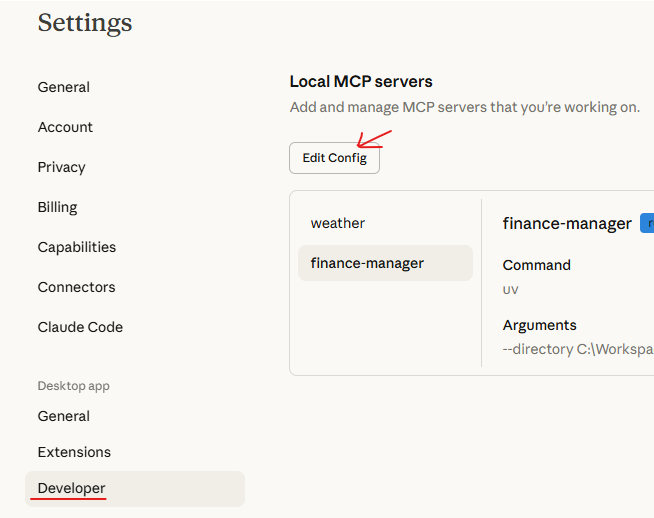
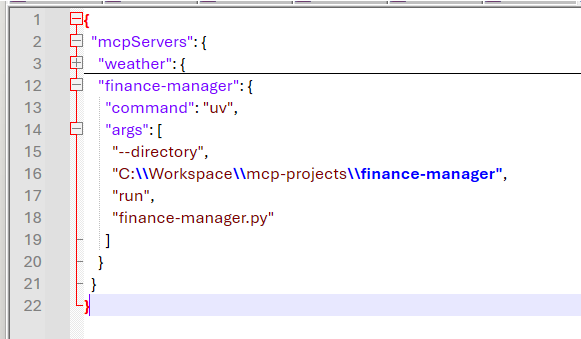
Open “claude_desktop_config” JSON file in Notepad. Add configurations in the JSON as below. The configurations define the path where MCP server implementation is located and instruct command to MCP host to run. Save the file and close.
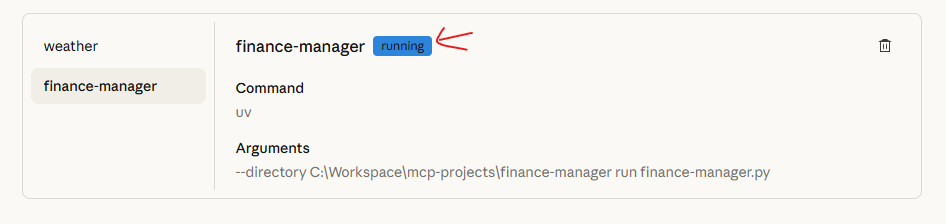
Restart “Claude Desktop” application, go to Settings -> Developer -> Local MCP servers tab. The newly added MCP server (finance-manager) will be in running state as below,
Go to chat window in Claude Desktop. Issue a prompt to fetch details of an account in “accounts” table and review the response,
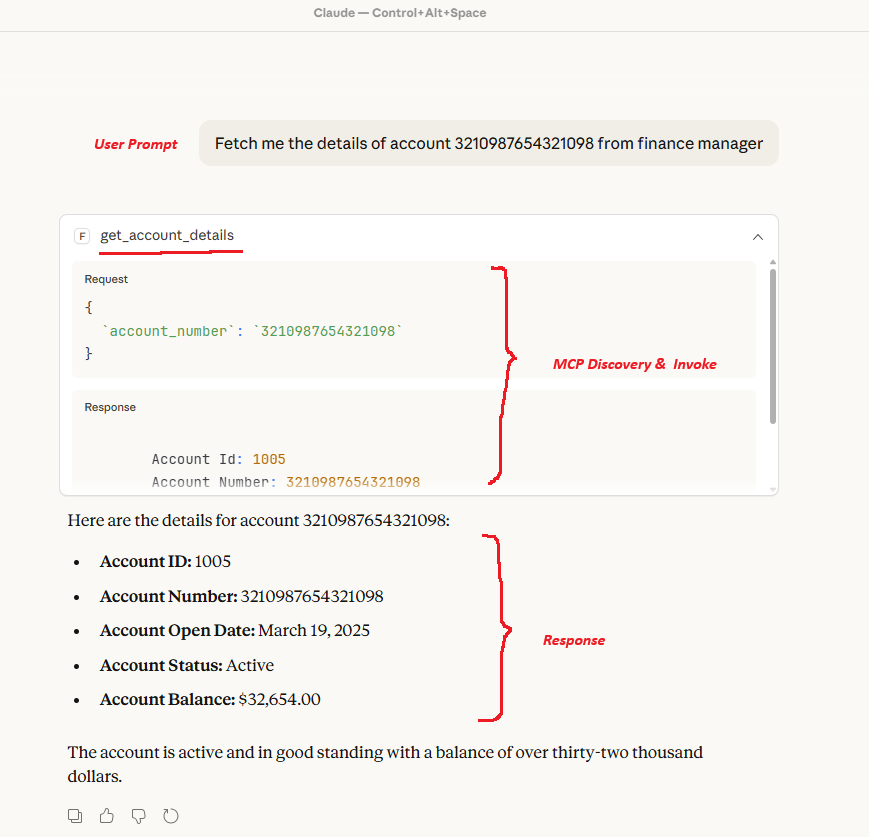
User Prompt: User issues a prompt to fetch details of an account.
MCP Discovery & Invoke: The client (Claude Desktop) processes the prompt, interacts with MCP host, automatically discover the relevant capability – get_account_details function in this case – without explicitly mention the function name and invoke the function with necessary parameter.
Response: MCP server process the request, fetch account details from the table and respond details to the client. The client formats the response and present it to the user.
Another example to add a transaction in the backend table for an account,
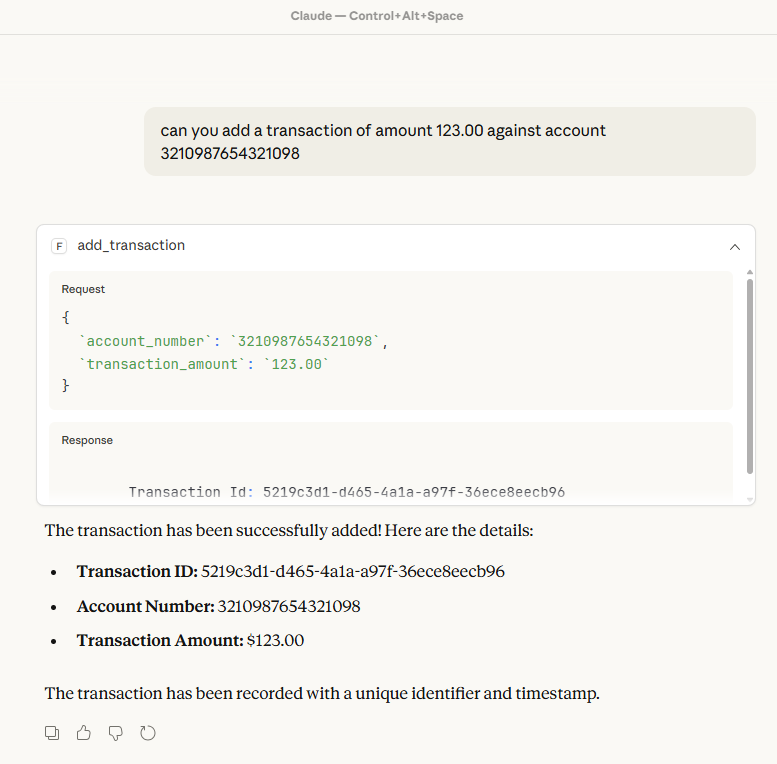
Here, “add_transaction” capability has been invoked to add a transaction record in “transactions” table. In the chat window, you could notice that what MCP function is being invoked along with request & response body.
The record has been successfully added into the table,

Impressive, isn’t it..!!
There are a wide range of use cases implementing MCP servers and integrate with enterprise AI systems that bring in intelligent layer to interact with enterprise data sources.
Here, you may also develop a thought that in what ways MCP (Model Context Protocol) is different from RAG (Retrieval Augmented Generation), as I did so. Based on my research, I just curated a comparison matrix of the features that would add more clarity,
| Aspect | RAG (Retrieval Augmented Generation) | MCP (Model Context Protocol) |
| Purpose | Retrieve unstructured docs to improve LLM responses | AI agents access structured data/tools dynamically |
| Data Type | Unstructured text (PDFs, docs, web pages) | Structured data (JSON, APIs, databases) |
| Workflow | Retrieve → Embed → Prompt injection → Generate | AI requests context → Protocol delivers → AI reasons |
| Context Delivery | Text chunks stuffed into prompt | Structured objects via standardized interface |
| Token Usage | High (full text in context) | Low (references/structured data) |
| Action Capability | Read-only (information retrieval) | Read + Write (tools, APIs, actions) |
| Discovery | Pre-indexed vector search | Runtime tool/capability discovery |
| Latency | Retrieval + embedding time | Real-time protocol calls |
| Use Case | Q&A over documents, chatbots | AI agents, tool calling, enterprise systems |
| Maturity | Widely adopted, mature ecosystem | Emerging standard (2025+) |
| Complexity | Vector DB + embedding pipeline | Protocol implementation + AI agent |
Conclusion
MCP Servers extend the capabilities of AI assistants by allowing them to interact with external services and data sources using natural language commands. Model Context Protocol (MCP) has a wide range of use cases and there are several enterprises already implemented and hosted MCP servers for AI clients to integrate and interact.
Some of the prominent MCP servers include:
GitHub MCP Server: Allows AI to manage repositories, issues, pull requests, and monitor CI/CD workflows directly within the development environment.
Azure DevOps MCP Server: Integrates AI with Azure DevOps services for managing pipelines, work items and repositories, ideal for teams withing the Microsoft ecosystem.
PostgreSQL MCP Server: bridges the gap between AI and databases, allowing natural language queries, schema exploration and data analysis without manual SQL scripting.
Slack MCP Server: Turns Slack into an AI-powered collaboration hub, enabling message posting, channel management

Clear and easy to understand—this simplified explanation of the Model Context Protocol makes a complex concept feel approachable. It’s a great quick read for anyone wanting to grasp MCP without getting lost in technical jargon.