Series: Enterprise GenAI & RAG Architecture — Part 1 of 5
The Problem Nobody Talks About
Your organization has rolled out a new AI assistant. Your team is excited. Someone asks it, “What is our leave policy?”. It responds quickly and confidently, but the answer misses the mark.
This does not mean the model is broken. It means the model only knows what it has been trained on and what information it can access at the moment of the request.
LLMs are trained on broad data sources up to a cutoff date. Unless they are connected to your enterprise content, they do not know your internal systems, policies, documents, or processes.
Think about everything an LLM may not know about your company:
- Your SharePoint intranet and HR policies
- Your product documentation and release notes
- Your Jira tickets and project history
- Your internal PDFs, SOPs, and compliance documents
- Any update that happened after the model’s training cutoff
For consumer chatbots, this may not matter as much. For enterprise AI, it creates a clear need for trusted, company-specific context.
Enter RAG: Retrieval-Augmented Generation
RAG is the architecture pattern that solves this problem. The name tells you exactly what it does:
Retrieval — Search your private enterprise knowledge base to find relevant content.
Augmented — Add that content as context to the LLM’s prompt.
Generation — Let the LLM generate an answer grounded in YOUR data.
Instead of relying solely on what the model was trained on, RAG dynamically fetches the right information at query time and hands it to the LLM. The result: accurate, current, enterprise-aware answers.
RAG is not a product. It is an architecture pattern. It works with GPT-4, Claude, Llama, and virtually any LLM.
A Simple Analogy
Imagine hiring a brilliant consultant who has read every book ever published but has never worked at your company. If you ask them about your internal processes, they’ll guess, improvise, or politely say they don’t know.
Now give that consultant access to your company’s document library before every meeting. They can look up the right information, cite the exact source, and give you a confident, accurate answer.
That’s RAG. The consultant is the LLM. The document library is your vector database.
How RAG Works — The Architecture
Every enterprise RAG system — whether built on Azure, AWS, or Oracle Cloud — follows the same five-stage architecture. The diagram below shows the complete flow from raw enterprise data to a grounded, cited answer.
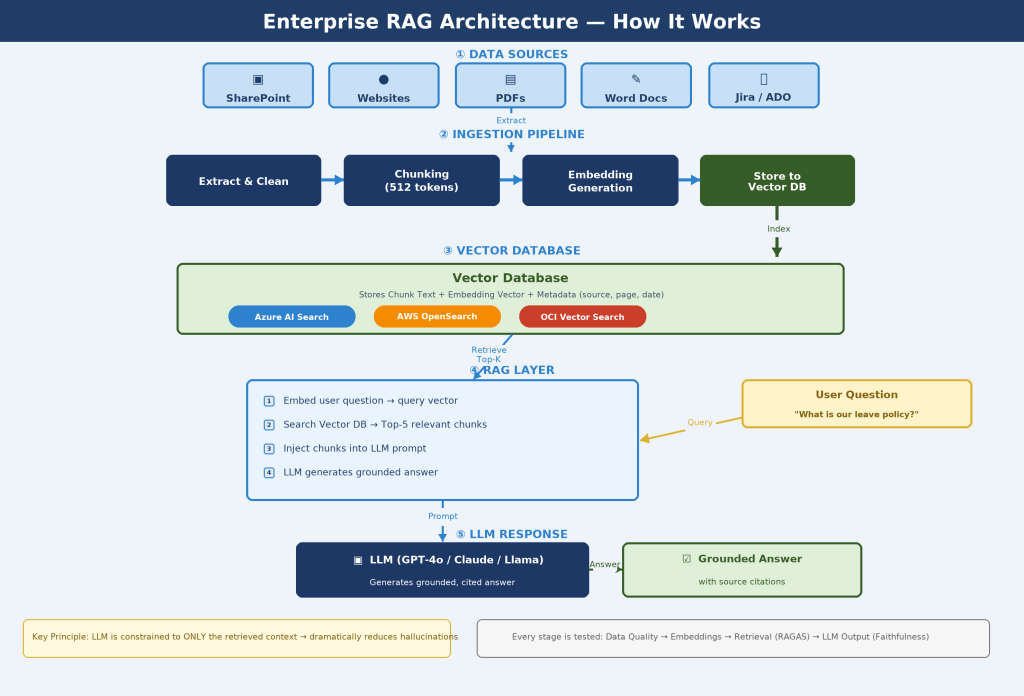
Figure 1: Enterprise RAG Architecture — 5-Stage Flow (Data Sources → Ingestion → Vector DB → RAG Layer → LLM Response)
Stage 1 — Data Sources
Enterprise documents from SharePoint, websites, PDFs, Word files, and Jira are the raw knowledge base. These are ingested automatically whenever content changes.
Stage 2 — Ingestion Pipeline
Each document is extracted, cleaned, and split into small chunks (typically 512 tokens). Every chunk is then converted into a vector embedding — a list of numbers that encodes its semantic meaning — using an embedding model such as Azure OpenAI text-embedding-3-small, Amazon Titan, or OCI Embed.
Stage 3 — Vector Database
Each chunk, its embedding vector, and its metadata (source, page, date) are stored in a Vector Database. On Azure this is Azure AI Search; on AWS it is OpenSearch; on Oracle Cloud it is Oracle DB 23ai with native VECTOR support.
Stage 4 — RAG Layer
When a user asks a question, it is embedded using the same model. The vector database returns the Top-5 most semantically similar chunks. These are injected into the LLM prompt as grounding context.
Stage 5 — LLM Response
The LLM (GPT-4o, Claude, or Llama) generates an answer constrained to the retrieved context only. Every claim in the answer can be traced back to a source document — which helps reduce unsupported or inaccurate responses.
The LLM is instructed: ‘Answer ONLY using the provided context. If the context does not contain the answer, say so.’ This instruction helps ensure responses stay grounded in provided information.
RAG Components at a Glance
| RAG Component | What It Does |
| 1. Data Sources | SharePoint, PDFs, Websites, Jira, Word Docs — your enterprise knowledge |
| 2. Data Ingestion | Extract → Clean → Chunk (512 tokens) → Embed → Store |
| 3. Vector Database | Stores all chunk embeddings, enables millisecond similarity search |
| 4. RAG Layer | Retrieve Top-K context → Build grounded prompt → Call LLM |
| 5. LLM Response | Generates accurate, cited answer from retrieved context only |
| Testing & Evaluation | RAGAS, DeepEval, PromptFoo — validates quality at every stage |
| CI/CD Pipeline | Automates ingestion, evaluation, and deployment on every change |
Why This Matters for Enterprises
RAG is now the standard architecture for enterprise AI. Here is why organizations are adopting it at scale:
Accuracy: Answers are grounded in real, current company data — not stale training data.
No retraining required: Add new documents and they’re immediately searchable. No expensive fine-tuning.
Source attribution: Every answer can cite which document it came from — enabling full auditability.
Cost efficiency: Retrieval is cheap. You only send relevant chunks to the LLM, saving tokens.
Data security: Your private data stays in your infrastructure — never sent to train external models.
RAG doesn’t replace the LLM’s intelligence. It gives the LLM the right information to be intelligent about YOUR business.
What’s Coming in This Series
This is part 1 of a 5-part series on building, deploying, and testing enterprise RAG systems:
➡ In Part 2, we’ll walk through exactly how documents get ingested, chunked, and stored in a vector database — the foundation your RAG system’s quality depends on.