
Introduction:
Recently I have faced an issue in my project on using the multipart and JSON simultaneously. I would like to share my knowledge on how this issue can be fixed.
For this scenario, I have taken a sample Spring-Boot application that uses JSON/ POJO and Multipart. Below are the steps to achieve passing the multiple files using POJO at a same time
Swagger-UI (2.9.2) doesn’t support the list of multipart file API. So, I used Postman. Let’s go for it.
Step 1: Create a simple Spring-Boot application.
Create a Spring or Spring-Boot application in eclipse IDE. Alternatively, we can download it from Spring.io on website.
Project Structure:
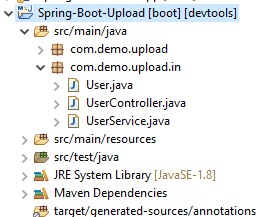
Step 2: Create one Controller, Model and Service.
Now, I’m taking the user details and a user can upload list of files simultaneously. File details are not required to be added in the User POJO class.
User:
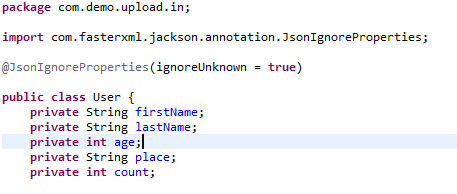 Created getters and setters for the POJO class.
Step 3: Use Multipart in Controller.
As we all know, Controller defines our action and when we want to create certain API and get a response through the API.
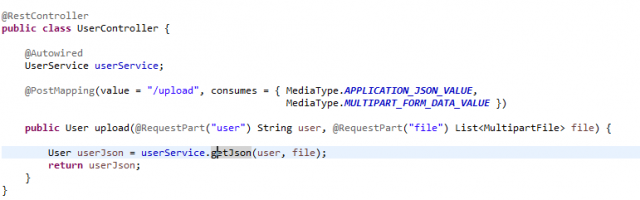
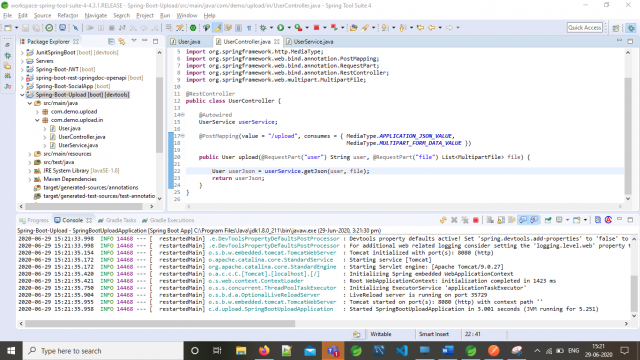
To pass the Json and Multipart in the POST method we need to mention our content type in the consume part.
consumes = { MediaType.APPLICATION_JSON_VALUE,MediaType.MULTIPART_FORM_DATA_VALUE })
And we need to pass the given parameter as User and Multipart file. Here, make sure we can pass only String + file not POJO + file.
@RequestPart(“user”) String user, @RequestPart(“file”) List<MultipartFile> file
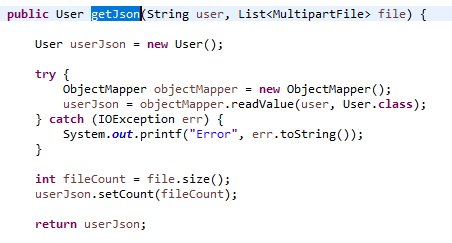
Then convert the String to Json using ObjectMapper in Service layer.
UserController:
 Step 4: Change the POJO to String.
Usually we add @RequestBody and mention the Class name for creating a data using POST method. But here, we should add both Json and multipart both. So, annotation should be altered.
@RequestPart(“user”) instead of @RequestBody(“user”)
Step 5: Invoke the String to Json.
Convert the String to Json using ObjectMapper. Call it from controller to Service as below :
User userJson = userService.getJson(user, file);
UserService:
 Step 6: Testing with our API.
Step 7: Upload the Multipart file and POJO in Postman.
Now, Test the response using Postman by adding the body parameters and values as below.
Endpoint: Post – http://localhost:8080/upload
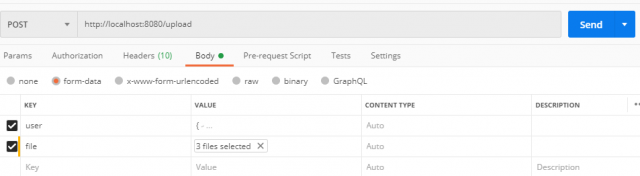
Sample Request:
{
“firstName”: “Aadhi”,
“lastName” :”Sakthi”,
“age”: 10,
“place”: “Chennai”
}
Now let us attach the sample file which we need to pass in the request.
Response:
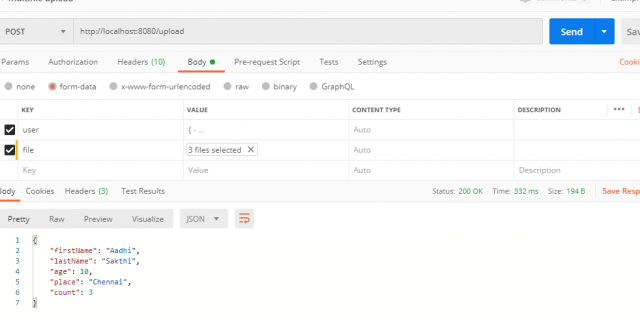 Looks like all done and dusted…!!!
You may get the source code from here: PraseelaRadhakrishnan/Spring-Boot/Spring-Boot-Upload
Conclusion:
Hopefully this documentation will be useful for you.