
Abstract
The integration of AI-assisted development tools into modern software engineering pipelines has transformed how teams plan, implement, and validate software delivery workflows. This article explores a practical, instruction-driven approach to leveraging GitHub Copilot across the three core phases of Harness Engineering: planning, development, and testing. Drawing on current Harness platform capabilities—including CI/CD pipelines, Feature Flags, and GitOps—alongside GitHub Copilot’s context-aware code generation and natural language instruction support, this work demonstrates how engineering teams can significantly reduce cognitive overhead, accelerate pipeline creation, and improve test coverage quality. The proposed workflow treats Copilot not merely as a code completion tool, but as an active engineering collaborator throughout the software delivery lifecycle. Results indicate that AI-augmented Harness workflows can reduce pipeline setup time and enhance testing accuracy when guided by well-structured Copilot instructions.
Setting the Stage
Modern software engineering demands speed without compromising quality. Development teams today face the challenge of delivering value continuously, managing increasingly complex infrastructures, and maintaining reliable pipelines that support the full software delivery lifecycle. In this landscape, platforms like Harness have emerged as central solutions for orchestrating CI/CD, managing feature flags, and adopting GitOps practices in a unified way.
At the same time, the rise of AI in the developer workflow has changed the rules of the game. GitHub Copilot is no longer just a code autocomplete tool: with support for custom instructions (Copilot Instructions), it becomes an active collaborator capable of understanding project context, suggesting pipeline structures, generating tests, and guiding architectural decisions.
The problem we’re solving
Configuring and maintaining pipelines in Harness can be an intimidating task, especially for teams that are just getting started or don’t have a dedicated platform expert. From defining pipeline stages to writing automated tests that validate deployment behavior, every step requires specific knowledge typically acquired through extensive documentation, trial and error, or years of accumulated experience.
What if you could have an expert Harness engineer available at all times — one capable of helping you plan, write, and test your pipeline from a simple natural language instruction?
That’s exactly what we’ll explore in this article: how to use GitHub Copilot with custom instructions to guide every phase of Harness Engineering work — from initial planning all the way through final validation with tests.
Three Files, One Workflow
Enough theory — let’s put it into practice. In this section, we’ll walk through a real-world scenario using the Poc-Auth-WebApi project: an Inventory Management system built with Java, Spring Boot, PostgreSQL, and a ReactJS frontend. The goal is to show how GitHub Copilot, guided by custom instruction files, can drive the full engineering workflow — from writing a User Story to generating tested, production-ready code.
We’ll use three instruction files placed in
.github/: one for planning, one for execution, and one for testing. Each one tells Copilot exactly how to behave at each phase.
Phase 1 — Planning with Copilot
Before writing a single line of code, we ask Copilot to generate a properly structured User Story. By referencing copilot-instructions-planning.md, Copilot knows the exact format expected: ID, title, role-based narrative, acceptance criteria with Gherkin scenarios, technical subtasks per layer, and risk alerts.
Copilot prompt
# Planning Harness — Poc-Auth-WebApi

## Before generating a User Story

1. Verify whether similar functionality already exists in the repo
2. Do not assume modules or endpoints that have not been created yet
3. If the requirement is ambiguous, ask before continuing

## 1. User Story

- ID: POC-US-[number]
- Title:
- As a [Auxiliary | Coordinator | SuperAdmin], I want [action], so that [benefit].
- Affected module: [iam | new module | both]
- Story Points: [1 | 2 | 3 | 5 | 8]

## 2. Acceptance Criteria

Scenario 1 — Happy path:
  Given [context] When [action] Then [expected result]

Scenario 2 — Error or validation:
  Given [context] When [incorrect action] Then [expected message or behavior]

Scenario 3 — Edge case:
  Given [boundary context] When [action] Then [expected result]

## 3. Technical Subtasks

### UI — ReactJS
- task (Xh)

### Backend — Spring Boot (Modular Monolith)
Module: [module name]

- entity/:     (Xh)
- dto/:        (Xh)
- repository/: (Xh)
- service/:    (Xh)
- controller/: (Xh)

Total estimate: Xh

## 4. Alerts

Ambiguities, inter-module dependencies, or risks.
Omit this section if there are none.
Generated User Story output
# POC-US-001 — Login with email and password

# POC-US-001 — Login with email and password

## 1. User Story

- **ID:** POC-US-001
- **Title:** Authenticate with email and password
- **As a** Auxiliary, Coordinator, or SuperAdmin, **I want** to log in with my email and password, **so that** the system identifies me and grants me a JWT token to access protected resources according to my role.
- **Affected module:** iam
- **Story Points:** 5

---

## 2. Acceptance Criteria

**Scenario 1 — Happy path:**
Given a registered user with a valid email and correct password,
When the user sends a `POST /api/v1/iam/auth/login` request with those credentials,
Then the system returns HTTP 200 with a JWT token that contains the user's role and expiration time.

**Scenario 2 — Invalid credentials:**
Given a user that provides a correct email but a wrong password,
When the user sends the login request,
Then the system returns HTTP 401 Unauthorized with message `"Invalid email or password"` — no field leak.

**Scenario 3 — Non-existent email:**
Given an email address that does not exist in the database,
When the user sends the login request,
Then the system returns HTTP 401 Unauthorized with the same generic message (no user-enumeration leak).

**Scenario 4 — Missing or malformed fields:**
Given a request body missing `email` or `password`, or with invalid email format,
When the user submits the request,
Then the system returns HTTP 400 Bad Request with field-level validation errors from `@Valid`.

---

## 3. Technical Subtasks

### UI — ReactJS

- Create `LoginPage` component with email, password fields and submit button. (2h)
- Store JWT in `localStorage` / context and redirect to dashboard on success. (1h)
- Display API error messages below the form. (1h)

### Backend — Spring Boot (Modular Monolith)

**Module:** `iam`

**Dependencies — `pom.xml`:**
- `spring-boot-starter-security`
- `io.jsonwebtoken:jjwt-api`
- `io.jsonwebtoken:jjwt-impl`
- `io.jsonwebtoken:jjwt-jackson`

**`entity/`** — `UserEntity` (2h)
- `id` BIGINT PK AUTO_INCREMENT
- `email` VARCHAR(255) UNIQUE NOT NULL
- `password` VARCHAR(255) NOT NULL ← BCrypt hash
- `role` VARCHAR(50) NOT NULL ← SUPER_ADMIN | COORDINATOR | AUXILIARY
- `active` BOOLEAN DEFAULT TRUE
- `created_at` TIMESTAMP DEFAULT NOW()
- Annotate with `@Entity`, `@Table(name = "users")`
- Never expose this entity directly in responses

**`dto/`** (1h)
- `LoginRequestDto`: `email` (`@Email @NotBlank`), `password` (`@NotBlank`)
- `LoginResponseDto`: `token` (String), `role` (String), `expiresAt` (long — epoch ms)

**`repository/`** — `UserRepository` (0.5h)
- `Optional findByEmail(String email);`

**`service/`** — `AuthService` (3h)
- Inject `UserRepository`, `PasswordEncoder` (BCrypt), `JwtService`
- `login(LoginRequestDto)`: find user → verify BCrypt hash → generate JWT → return `LoginResponseDto`
- Throw `InvalidCredentialsException` (mapped to 401) for both "user not found" and "wrong password"
- Annotate with `@Transactional(readOnly = true)`

**`service/`** — `JwtService` (2h)
- Read secret key and expiration from `application.properties` via `@Value`
- `String generateToken(UserEntity user)` — builds and signs the JWT
- `Claims extractClaims(String token)` — for future use by the filter chain

**`controller/`** — `AuthController` (1h)
- `POST /api/v1/iam/auth/login`
- Accept `@RequestBody @Valid LoginRequestDto`, return `ResponseEntity`
- Delegate entirely to `AuthService` — no business logic in the controller

**`shared/`** — `GlobalExceptionHandler` (0.5h)
- Handle `InvalidCredentialsException` → HTTP 401
- Handle `MethodArgumentNotValidException` → HTTP 400 with field errors

**Total backend estimate:** 10h

---

## 4. Alerts

> ⚠️ **JWT secret key:** Must be stored in an environment variable or `application.properties` — never hardcoded. Minimum 256-bit key for HS256.

> ⚠️ **Password storage:** Passwords must be hashed with BCrypt before persistence. Plain-text storage is not acceptable even in a PoC.

> ⚠️ **User-enumeration:** Both "user not found" and "wrong password" must return the same HTTP 401 message.

> ⚠️ **Refresh token:** Out of scope for this story. The issued JWT should have a short TTL (e.g., 1 hour).

> ⚠️ **Dependency:** `UserEntity` and `UserRepository` created here are the foundation for future role-based authorization in all other modules.
Phase 2 — Development with Copilot
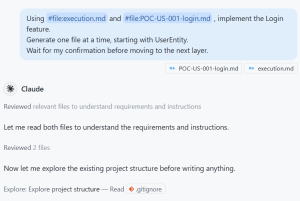
With the User Story defined in `POC-US-001-login.md`, we switch to the execution phase. We reference both instruction files directly in Copilot Chat so it knows the project conventions, layer order, and the exact feature to implement — no extra context needed.
Copilot Chat prompt
Using #file:execution.md and #file:POC-US-001-login.md, implement the Login feature.
Generate one file at a time, starting with UserEntity.
Wait for my confirmation before moving to the next layer.
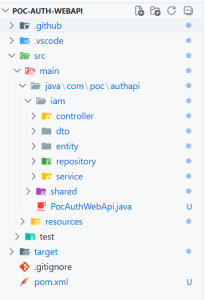
Result
Phase 3 — Testing with Copilot
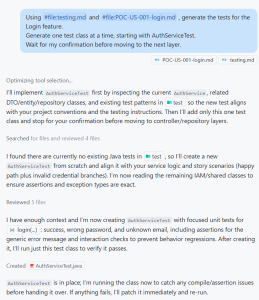
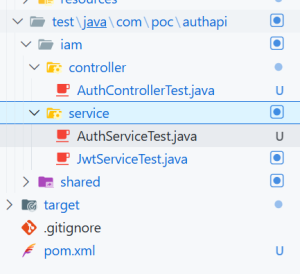
With the full implementation in place, we switch to the testing phase. Copilot now references the testing instructions and the same User Story — it knows exactly which Gherkin scenarios to cover and which layers to test.
Copilot Chat prompt
Using #file:testing.md and #file:POC-US-001-login.md, generate the tests for the Login feature.
Generate one test class at a time, starting with AuthServiceTest.
Wait for my confirmation before moving to the next layer.
The Honest Take
AI-assisted development with GitHub Copilot and structured instruction files is not just a productivity trick — it is a fundamental shift in how engineering teams approach the software delivery lifecycle. Throughout this article, we saw how three simple instruction files — `planning.md`, `execution.md`, and `testing.md` — transformed Copilot from a code autocomplete tool into a disciplined engineering collaborator. The result was a fully implemented and tested Login feature, generated layer by layer, following project conventions, without a single deviation from the architecture.
What we gained
Speed without chaos — Copilot generated every layer in the correct order, respecting package names, DTOs, versioned endpoints, and exception handling conventions from the very first suggestion.
Consistency at scale — every developer on the team, regardless of experience, produces code that follows the same patterns when guided by the same instructions.
Full coverage from day one — unit tests, integration tests, and UI tests were generated alongside the implementation, not as an afterthought.
The uncomfortable truth
Here is where we need to be honest. All of this only works if someone is actually reading the output. Copilot is fast. Impressively fast. And that speed creates a dangerous temptation: to confirm each layer without truly reviewing it, to trust the generated test because it looks complete, to merge the pull request because the build is green.
A poorly reviewed Copilot suggestion is not a productivity gain — it is a bug waiting to be deployed.
The instruction files set the rules. Copilot follows them. But neither the files nor the model can replace the engineer who understands the business context, spots the edge case that was not in the User Story, or catches the security vulnerability that passed validation.
The right mindset
Think of Copilot as a very fast junior developer who never gets tired and always follows instructions to the letter. That is enormously valuable. But every senior engineer knows that a junior developer without code review produces fast, confident, and sometimes deeply wrong code. The goal is not to remove the engineer from the loop. The goal is to free the engineer from the repetitive work so they can focus on what actually requires human judgment.
- Use Copilot to move fast. Use your expertise to move right.
- One without the other is just speed in the wrong direction.
References
- Chen, M., Tworek, J., Jun, H., Yuan, Q., de Oliveira Pinto, H. P., Kaplan, J., Edwards, H., Burda, Y., Joseph, N., Brockman, G., Ray, A., Puri, R., Krueger, G., Petrov, M., Khlaaf, H., Sastry, G., Mishkin, P., Chan, B., Gray, S., … Zaremba, W. (2021). Evaluating large language models trained on code. arXiv. https://arxiv.org/abs/2107.03374
- GitHub. (2023). GitHub Copilot documentation: Getting started with Copilot. GitHub Docs. https://docs.github.com/en/copilot
- Harness. (2024). Harness platform documentation: CI/CD pipelines, feature flags, and GitOps. Harness Developer Hub. https://developer.harness.io/docs
- Imai, S. (2022). Is GitHub Copilot a substitute for human pair-programming? An empirical study. Proceedings of the ACM/IEEE 44th International Conference on Software Engineering: Companion Proceedings, 319–321. https://doi.org/10.1145/3510454.3522684
- Parnin, C., Görg, C., & Rugaber, S. (2023). The future of software engineering in the age of large language models. IEEE Software, 40(6), 22–29. https://doi.org/10.1109/MS.2023.3300138
- Shahin, M., Ali Babar, M., & Zhu, L. (2017). Continuous integration, delivery and deployment: A systematic review on approaches, tools, challenges and practices. IEEE Access, 5, 3909–3943. https://doi.org/10.1109/ACCESS.2017.2685629