
In the rapidly evolving world of artificial intelligence, the shift from cloud-based processing to on-device AI is transforming how we interact with technology. Google is at the forefront of this revolution with Google AI Edge, a comprehensive suite of tools designed to help developers deploy high-performance AI directly on mobile, web, and embedded devices.
This recent rollout changes the game for how developers add smart features to applications. By moving processing to the edge, everything runs directly on the device—meaning faster performance, no need for an internet connection, and significantly better privacy since sensitive data stays local.
True Cross-Platform Support
One of the standout features of this update is its flexibility. In the past, running models across different ecosystems was a headache. Google AI Edge solves this with robust cross-platform support.
A single model can now work smoothly across Android, iOS, web browsers, and even small embedded hardware. Furthermore, it supports major frameworks like JAX, Keras, PyTorch, and TensorFlow, allowing you to avoid painful conversions when switching tools.
The Google AI Edge Stack

Google AI Edge isn’t just a single tool; it’s a full ecosystem designed to bridge the gap between complex ML models and consumer hardware.
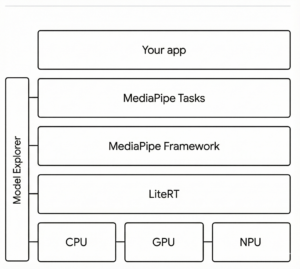
1. LiteRT (formerly TensorFlow Lite)
Recently renamed to LiteRT, this is the backbone of on-device execution. It is a high-performance runtime that enables fast model running with hardware acceleration (optimizing performance across NPUs, GPUs, and CPUs).
2. MediaPipe
If you need speed and ease of use, MediaPipe provides “low-code” solutions for common tasks. This includes ready-made APIs for object detection, hand tracking, and text processing.
3. Gemini Nano
The crown jewel of efficient AI, Gemini Nano is Google’s most efficient model built specifically for on-device tasks. With recent updates, Gemini Nano is now available for Android testing, making it much easier to build advanced, generative AI apps.
Experience it Live: The Google AI Edge Gallery
Reading about on-device AI is one thing, but seeing it in action is another. Google has released the AI Edge Gallery, an open-source Android and iOS application that showcases what’s possible today.
The Gallery isn’t just a tech demo; it’s a playground where you can run GenAI models fully offline. Key features include:
- Tiny Garden: An experimental mini-game where you use natural language to plant and water flowers—processed entirely offline.
- Ask Image: Snap a photo and ask questions about it using visual question answering capabilities.
- Audio Scribe: Real-time transcription and translation of speech.
- Performance Metrics: For developers, the app displays real-time benchmarks like “Time To First Token” (TTFT) so you can see exactly how fast a model runs on your specific hardware.
Get Started
Developers who want quicker, smarter user experiences should definitely explore this update. Whether you are looking to integrate Gemini Nano into your app or just want to test the limits of your smartphone, Google AI Edge provides the pathway.
-
Visit the Developer Portal: ai.google.dev/edge
-
Download the Gallery App: github.com/google-ai-edge/gallery



Excellent summary of the Google AI Edge ecosystem, Mark. The shift toward LiteRT and Gemini Nano is a massive win for user retention. As the Best Digital marketing agency in Bangalore, we’ve observed that high latency is one of the leading causes of app abandonment.
Moving generative features on-device doesn’t just improve privacy; it fundamentally changes the ‘conversion’ math by removing the friction of slow network speeds.
I’m curious—have you seen any specific benchmarks on how Gemini Nano affects battery longevity during sustained use in the ‘Tiny Garden’ demo? That seems to be the last hurdle for wide-scale enterprise adoption.