
Before diving into key concepts, ensure that Optimizely CMS is set up on your local machine. You can refer to the detailed setup guide here: “Optimizely CMS Set Up: A Developer’s Guide / Blogs / Perficient”
Once Optimizely CMS is successfully configured, the following core concepts will help you understand how to work with pages, blocks, and rendering in your project.
Understanding Page Types and Block Types
Page Types
- Represent full pages in the CMS (e.g., Home Page, Article Page).
- Defined as C# classes inheriting from PageData.
- Each public property becomes a field editors can fill in the CMS.
Block Types
- Represent reusable content components (e.g., Teasers, Banners).
- Defined as C# classes inheriting from BlockData.
- Can be embedded in pages or reused across multiple pages.
In the Optimizely CMS project (created via dotnet new epi-alloy-mvc) add the files as below.
| Type | Folder | Example |
| Page Type | /Models/Pages/ | StandardPage.cs |
| Block Type | /Models/Blocks/ | TeaserBlock.cs |
Example: Basic Page Type
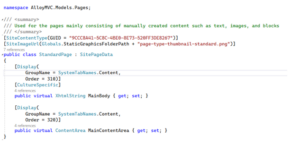
MainBody: Rich text field using XhtmlString for formatted content.
MainContentArea: For adding block into pages.
After compiling, the CMS UI will reflect this new page type, and editors can start creating pages.
Creating a Page
- Navigate to the page tree.
- Right-click a parent page → New Page.
- Select your new page type (e.g., “Standard Page”).
- Fill in the fields like Main Body and Main Content Area.
Working with Blocks

Blocks are reusable content chunks. Here’s how to create a simple text block:
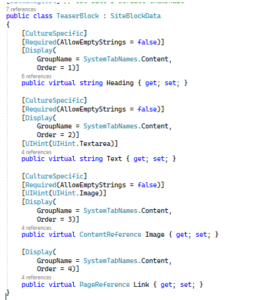
You can now drag and drop this block into any compatible page area.
Creating a Block
- Open the Assets Panel.
- Click New Block → Choose “Teaser Block”.
- Fill in the Heading and Image.
- Drag and drop the block into a content area on a page.
Routing and Rendering Views
Create Razor View for StandardPage
- A class /Models/Pages/StandardPage.cs
- Create a controller in /Controllers/StandardPageController.cs
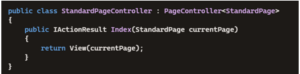
- Create the Razor view. Create the file: /Views/StandardPage/Index.cshtml
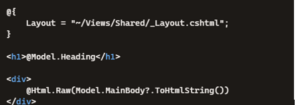
For adding block into pages add a content area to the razor view.
-
- In /Models/Pages/StandardPage.cs, add a property
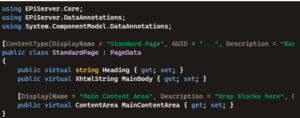
This creates a drop zone in the CMS UI where editors can add blocks. - In /Views/StandardPage/Index.cshtml, update the view
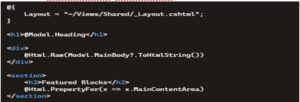
This renders whatever blocks the editor drops into MainContentArea.
- In /Models/Pages/StandardPage.cs, add a property
Once compiled and the site is running:
- Open a page of type Standard Page
- Find a field called Main Content Area
- From the Assets Panel, drag blocks (like Teaser Block) into this area
- Publish the page and view it in browser.
Admin & Edit mode
Access the CMS back office:
- Navigate to /episerver
- Login with the seeded admin account or set one up using Identity or ASP.NET Core Identity providers
Preview & Debugging
Use Visual Studio’s debugger, breakpoints, and logs. CMS also offers content preview modes and version management tools.
Deployment Basics
You can deploy Optimizely CMS using:
- Azure App Services
- IIS on Windows Server
- Docker (with a configured image)
Use dotnet publish for build output:

Content Editing Experience
Optimizely offers:
- Inline editing
- Drag-and-drop interface
- Preview modes by device and visitor group
Content editors can switch languages, schedule publishing, and experiment with layout—all from the CMS UI.
Conclusion
Optimizely CMS offers a structured and extensible framework for building content‑driven websites. By understanding core concepts such as Page Types, Block Types, and view rendering, developers can quickly create scalable and reusable components. Combined with its intuitive editing tools, Optimizely enables teams to deliver and manage content efficiently, making it a strong foundation for modern digital experiences.
