Microsoft Work IQ is a new AI-driven intelligence layer in Microsoft 365 that understands how your organization actually works – far beyond the org chart – and uses that knowledge to make Copilot and AI agents context-aware by default. Announced at Ignite 2025, Work IQ gives Copilot “brains,” turning raw workplace data into actionable understanding. In practical terms, it finds patterns and context in your enterprise data, so AI assistants deliver answers and actions as if they truly know your business. This is a game-changer for IT leaders looking to harness AI: it means your AI won’t just retrieve information, it will understand it in context.
At its core, Work IQ is the intelligence layer that enables Microsoft 365 Copilot and agents to know you, your job, and your company inside and out. It continuously analyzes the rich signals in your digital workspace – emails, files, chats, meetings – and learns from how work gets done in your organization. Microsoft describes Work IQ in three parts:
Put simply, Work IQ maps the real flow of work in your company. It doesn’t just know the theoretical structure in an HR system – it knows who actually collaborates, what documents really matter for each project, how information moves across teams, and what context is relevant to the task at hand. It builds a living model of your organization’s workflows.
These are the kinds of insights Work IQ continuously curates to paint a holistic picture of your operational reality. That intelligence is built into Microsoft 365 Copilot today – it’s the same brain that makes Copilot’s answers feel enterprise-aware. Now, importantly, your own custom agents can tap into Work IQ as well. This means when you build an AI bot or automation for your organization, it can leverage that shared “work brain” to behave more like a smart teammate instead of a naive script.
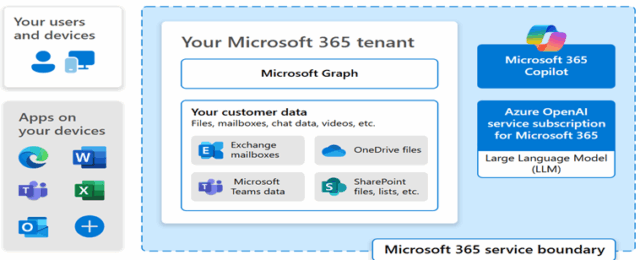
A common question is: How is Work IQ different from Microsoft Graph? After all, Microsoft Graph has long provided API access to mail, files, Teams, users, and more. The difference lies in raw data versus interpreted intelligence:
In summary, Microsoft Graph is indispensable for accessing raw data, but Work IQ is what makes that data immediately useful for AI. The Graph pulls facts while Work IQ finds patterns and insights in those facts. This distinction is key: Work IQ is what elevates an AI assistant from a basic tool into a knowledgeable collaborator.
Work IQ represents a strategic shift in how we build and deploy AI in the enterprise. Here are the key reasons it’s a big deal:
To make this more concrete, let’s look at how Work IQ can be applied in real scenarios that IT leaders care about:
Each of these scenarios highlights a pattern: Work IQ provides situational awareness that was previously missing in our software. It brings the same kind of contextual understanding that a long-tenured employee might have (“Oh, I know exactly who to ask about this issue, and I recall a similar project from last year…”) directly into our apps and agents. That dramatically improves both the user experience and the effectiveness of AI automation.
Microsoft Work IQ is a cornerstone of the “frontier firm” vision – a company where AI is woven into every workflow with a rich understanding of the business. For IT leaders, Work IQ offers a path to operationalize AI at scale: you get the power of Microsoft’s Graph data plus an intelligence model trained on your organization’s nuances. The end result is AI that feels native to your enterprise. Copilot and custom agents become smarter, more helpful colleagues rather than blunt instruments. Work IQ allows AI to find insights in context, rather than just pulling disjointed data fragments.
By leveraging Work IQ, you enable your AI systems to “know” your business in ways that were previously only in employees’ heads. That translates to faster decisions, less reinventing the wheel, and a significant leap in productivity. In short, Work IQ turns enterprise AI from a cool gadget into a deeply integrated, competitive capability. It is the intelligence that will help your organization’s digital workforce act with the insight and awareness of a seasoned team member – which is exactly what we need for AI to truly drive the next wave of workplace transformation.
]]>Microsoft Ignite 2025 marked a pivotal shift in enterprise AI strategy, introducing a new generation of autonomous agents and the governance tools needed to manage them responsibly. From sales and HR to IT and productivity, Microsoft’s announcements signal a future where AI agents are not just assistants—but active participants in business operations.
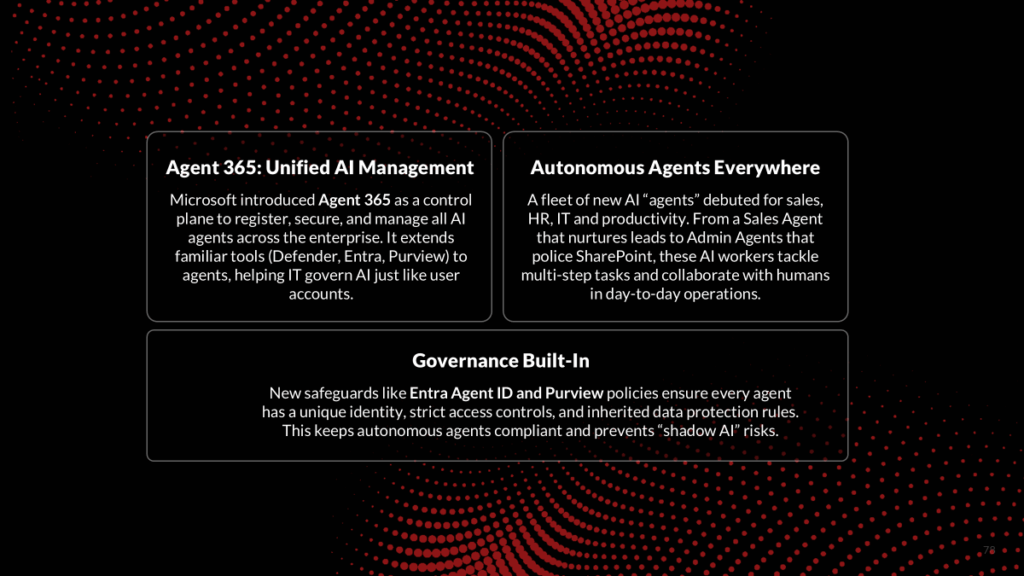
Several new AI agents debuted at Ignite, each designed to automate and assist in specific business processes:
Microsoft also announced Office Copilot Agents for Word, Excel, and PowerPoint within Microsoft 365 Copilot chat, which can generate and format content in those apps based on user prompts. These content-creation agents, while not fully autonomous, help users produce high-quality documents, spreadsheets, and presentations more efficiently. They are available in early access for Copilot customers.
Recognizing that deploying dozens or even hundreds of AI agents raises new oversight challenges, Microsoft introduced governance tools to help customers adopt agents safely and transparently:
The Ignite 2025 announcements underscore a dual message: significant productivity gains are now within reach through AI agents, and Microsoft is delivering the controls to deploy these agents responsibly. The potential benefits include:
Microsoft Ignite 2025 marked a clear shift from AI as a mere assistant to AI as a full-fledged workforce layer, with Microsoft unveiling a unified agent ecosystem across Microsoft 365, Windows, and Azure, centered on Agent 365, a control plane for registering, securing, and managing agents with Entra-issued IDs. New features include Work IQ for personalized agent recommendations, dedicated Office and industry-specific agents, and Windows’ native agent infrastructure for secure integration. The message was clear: the future of work is agent-powered, but trust, compliance, and control must be built in from the start.
Table: Key Announcements on AI Agents and Governance (Ignite 2025)
| Feature / Tool | Description | Impact | Availability |
| Microsoft Agent 365 | Central command center for AI agents – provides a registry of all agents, access controls, real-time monitoring dashboards, and integrates security/compliance tools (Defender, Entra, Purview) for agents. | Enables IT to manage and secure AI agents at scale just like user accounts. Increases trust by preventing unmanaged “shadow” agents and enforcing consistent policies (identity, data protection) across all AI-driven processes. | Early Access Preview (Available now via the Frontier program in the M365 admin center.) |
| Microsoft Entra Agent ID | New identity management for AI agents – assigns each agent a unique Entra ID identity and credentials, with full support for Conditional Access and audit logging of agent sign-ins. Extends Zero Trust security to autonomous agents. | Tight access control for agents: Every agent operates under a known identity and role, so companies can apply least-privilege access and instantly revoke or adjust an agent’s permissions if needed. Builds trust that agents will only reach the data they’re authorized to use. | Preview (Introduced at Ignite; part of Entra updates rolling out in late 2025.) |
| Sales Development Agent | AI sales representative that autonomously researches prospects, crafts outreach emails, follows up with leads, and hands off interested customers to human sellers. Integrates with CRM systems (Dynamics 365, Salesforce) and works within Outlook/Teams to drive pipeline. | Scales up sales capacity by ensuring every lead is engaged promptly and persistently. Sales teams can convert more leads without adding staff, as routine prospecting and follow-ups are handled by the agent (with consistency and no downtime). | Frontier Preview (Available to test for participants in Dec 2025.) |
| Teams Channel AI Agents | Intelligent agents embedded in Microsoft Teams channels that can collaborate with users and connect to third-party apps via MCP (Model Context Protocol). They can aggregate data from other services (e.g. project trackers, DevOps tools) and initiate actions like scheduling meetings or updating tasks. | Enhances team collaboration by acting as a smart coordinator: the agent surfaces information from across the toolchain into Teams and automates cross-app steps. Teams become more productive as the agent reduces the need to manually check different apps or remember follow-ups. | Preview (New capability in Microsoft Teams, announced at Ignite 2025.) |
| Workforce Insights & HR Agents | A set of Work IQ-powered agents for HR: Workforce Insights Agent (real-time org analytics for leaders), People Agent (find colleagues by skill/role and suggest connections), Learning Agent (personalized training and upskilling content). | Data-driven people management and development. Leaders gain immediate insight into workforce composition and trends for better planning. Employees can more easily network internally and get targeted learning resources, leading to a more connected and skilled workforce. | Preview (Available via Frontier program as of Ignite 2025.) |
| Teams & SharePoint Admin Agents | IT administration agents for Microsoft 365: one in Teams Admin Center to automate tasks like user provisioning and system monitoring; another in SharePoint Admin Center to audit and fix site issues (inactive sites, oversharing, permission drift) via AI. | Always-on IT assistance that improves governance. Routine admin tasks are handled consistently and faster, reducing IT effort and human error. These agents also proactively enforce policies (e.g. cleaning up unused sites or tightening permissions), which strengthens security/compliance across collaboration platforms. | Preview (Both announced in preview at Ignite 2025.) |
| Microsoft Purview AI Governance | Purview compliance features for AI – extended DLP policies to monitor and block sensitive data in AI prompts or outputs; Purview’s DSPM now inventories all AI agents and assesses their risk posture; audit trails cover AI agent activities for eDiscovery and oversight. | Maintains compliance and security in an AI-driven environment. Companies can trust that adopting AI agents won’t lead to data leaks or compliance violations, because existing data protection rules automatically apply. Every action by an agent is logged and auditable, which is crucial for industries with strict regulations. | Preview / Rolling Out (Announced at Ignite; incremental rollout through late 2025 into 2026 for various Purview enhancements.) |
]]>
As the year wraps up, so does an incredible run of conferences spotlighting the best in Microsoft 365, Power Platform, and Copilot innovation. We’re thrilled to share that Amarender Peddamalku, Microsoft MVP and Practice Lead for Microsoft Modern Work at Perficient, will be speaking at the Microsoft 365, Power Platform & Copilot Conference in Dallas, November 3–7.
Amarender has been a featured speaker at every TechCon365, DataCon, and PWRCon event this year—and Dallas marks the final stop on this year’s tour. If you’ve missed him before, now’s your chance to catch his insights live!
With over 15 years of experience in Microsoft technologies and a deep focus on Power Platform, SharePoint, and employee experience, Amarender brings practical, hands-on expertise to every session. Here’s where you can find him in Dallas:
Whether you’re just getting started with Power Platform or looking to scale your automation strategy, Amarender’s sessions will leave you inspired and equipped to take action.
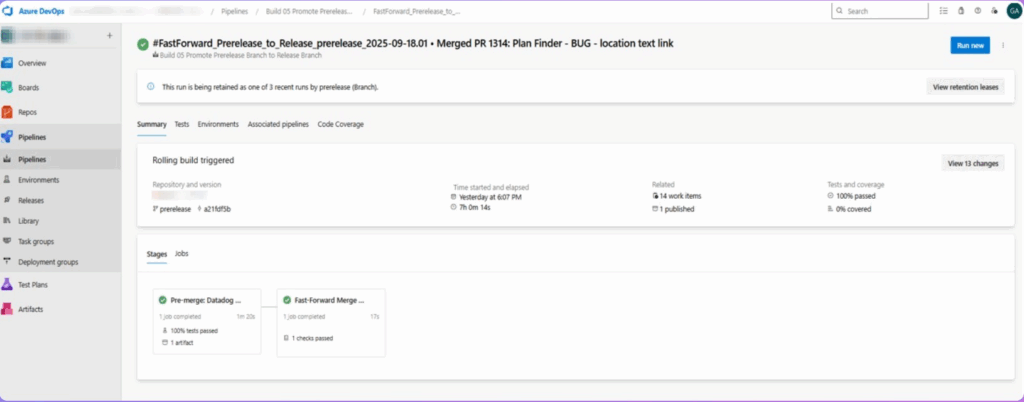
]]>Datadog Synthetic Monitoring provides automated, simulated user journeys to proactively confirm the health and performance of websites and APIs, helping detect issues before users experience them. Integrating this into our Azure DevOps pipeline ensures that only builds where core site functionality is verified get promoted, reducing the risk of regressions in production. This approach is especially valuable in Sitecore projects, where critical web journeys and API endpoints are essential to user experience.

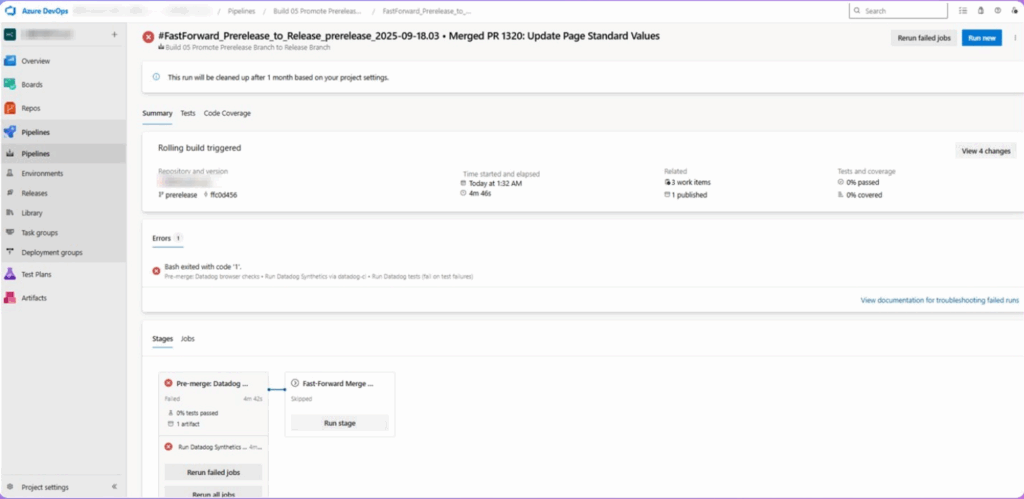
The Azure DevOps YAML pipeline is set up to invoke Datadog CI, run all tests matching our tag criteria, and fail the pipeline if any test fails.
Build artifacts include full logs for further review.

Only successful resolution and green reruns allow code promotion.

By integrating Datadog Synthetic Monitoring directly into our CI/CD pipeline with Azure DevOps. Sitecore teams gain a safety net that blocks faulty builds before they hit production, while keeping a detailed audit trail. Combined with careful test design, secure key management, and continuous expansion of coverage, this approach becomes a cornerstone of proactive web application quality assurance.
]]>
Microsoft Ignite 2025 is right around the corner—and Perficient is showing up with purpose and a plan to help you unlock real results with AI.
As a proud member of Microsoft’s Inner Circle for AI Business Solutions, we’re at the forefront of helping organizations accelerate their AI transformation. Whether you’re exploring custom copilots, modernizing your data estate, or building secure, responsible AI solutions, our team is ready to meet you where you are—and help you get where you want to go.
Here’s where you can connect with us during Ignite:
Join Us for Happy Hour
Unwind and connect with peers, Microsoft leaders, and the Perficient team at our exclusive happy hour just steps from the Moscone Center.
Fogo de Chão |
November 17 |
6:00–9:00 PM
Reach out to our team to get registered!
Book a Strategy Session
Need a quiet space to talk AI strategy? We’ve secured a private meeting space across from the venue—perfect for 1:1 conversations about your AI roadmap.
Ember Lounge — 201 3rd St, 8th floor, Suite 8016 |
November 18-20
Reserve Your Time
From copilots to cloud modernization, we’re helping clients across industries turn AI potential into measurable impact. Let’s connect at Ignite and explore what’s possible.
Microsoft Copilot Studio is a low-code/no-code workspace from Microsoft that helps you build, customize, and manage AI-powered assistants (called copilots or agents) for your organization. Think of it as a visual toolkit that connects large language models (LLMs) to your data sources (SharePoint, OneDrive, Dataverse, etc.), custom logic, and UI behaviors, enabling you to create helpful assistants that understand your company context and answer real workplace questions. Why it matters (in plain layman terms) Copilot Studio lets non-AI experts create assistants that do real work — summarize documents, answer policy questions, extract data, or route requests — without writing massive amounts of code. For beginners, it’s a gateway to real-world AI: you don’t need to manage models or infra; you focus on prompts, connectors, and experience.

Microsoft Copilot Studio makes creating AI assistants approachable even if you’re new to AI, and it combines model power with your company data, connectors, and low-code tooling so you can craft copilots that actually solve workplace problems. Start with a small, focused agent (one data source, one use case), test it in the playground, tighten security, and expand from there. With the official docs and community articles as guides, you’ll be iterating and improving helpful assistants in no time.
If you’d told me twenty years ago that I’d be working in the technology industry, I would have laughed. My background? Art, history, and social services—not exactly the usual path to tech. I still sew and do needlework, and I miss the days when you had to check an answering machine or hunt down a pay phone. Honestly, I thrived without knowing what my second cousin, three times removed, had for breakfast this morning. Sometimes, I feel like the old guy on the corner yelling, “get off my lawn!”
But life has a way of surprising us. My career took a hard left turn and landed me in the world of technology. At first, I thought, “No problem. My skills—problem solving, analysis, and communication—are still useful.” I didn’t need to dive too deep into the tech pool; basic Excel and PowerPoint were enough. Fourteen years later, I’m proof that a non-technical person can survive (and even thrive) in a technology company.
Then came 2025. Our new CEO announced that we were going to be an AI-First company. We were not only encouraged, but expected to use AI in our day-to-day work. Cue the mini panic attack. My mind raced: What part of my job could I hand over to AI? How was I supposed to figure this out?
The lowest hanging fruit was my semi-annual reports. But I actually enjoy making those! Me and my trusty adding machine (yes, I still use it) making charts and graphs, discovering trends, and recapping the year—it’s something I look forward to. I didn’t want to give that away to my computer.
But change was coming, whether I liked it or not. So, I took a deep breath and got on board. I completed every training offered and sat down with a coworker who was genuinely excited about AI. Together, we made a plan and found ways to integrate AI into my workflow. Anytime someone said, “You can use Copilot for that,” I’d ask how. Gradually, my panic eased and I started to see the possibilities.
Now, I use Copilot to summarize long technical documents in plain language, generate images for presentations, and organize meeting notes. I’m still not ready to give up my trusty adding machine or hand over my reports, but I’m finding other ways to use these tools to make my life easier.
Most people see AI as something that gives them more time in their day. I used to think it would take away the parts of my job I enjoyed. Turns out, I was mistaken. If you’re like me—afraid of adopting new technology and unsure how it can help—take a deep breath and start small. Try it out and see if it really does save you time. And if you haven’t asked Copilot to rewrite an email as if it were from a pirate yet, you’re missing out! Not every use case works for everyone, but everyone can find a use case.
So here’s my advice:
You don’t have to be an expert to benefit from AI. Start with one small task, ask questions, and let curiosity lead the way. You might be surprised at how much easier your work becomes—and you might even have a little fun along the way.
PS… I was able to use this post as a learning opportunity. I asked Copilot to review my article and make suggestions – most of which made the final draft. Another small step.
]]>Perficient is proud to be included in the IDC ServiceScape: Worldwide and U.S. Microsoft Power Apps Low-Code/No-Code Custom Application Development Services, 2025 (Doc# US53748825 September 2025) report. We believe this inclusion highlights our commitment to helping enterprises accelerate innovation and streamline development through Microsoft Power Platform.
This IDC ServiceScape offers a comprehensive guide on the key capabilities of custom application development service providers using the Microsoft Power Apps low-code/no-code development platform, featuring services from companies including Perficient. The status of each service capability is categorized as fully supported, partially supported, partner provided, road map, or not supported, aiding services buyers in quickly identifying which vendors align with their changing requirements.
Powering Innovation with Microsoft Power Platform
As digital transformation accelerates, low-code/no-code platforms are becoming essential tools for agility and innovation. Perficient is proud to be included in this evolving landscape and remains committed to delivering solutions that drive real business outcomes.
“Our approach to Power Platform is rooted in strategy, scale, and speed. We’re not just building apps—we’re enabling transformation. By combining governance frameworks, multi-shore delivery, and AI-powered experiences, we help clients unlock the full potential of low-code development and drive meaningful business outcomes.” – Eric Schmitt, Director of Microsoft Business Applications.
Perficient offers a comprehensive suite of low-code/no-code services designed to accelerate transformation:
We’re also increasing investment in Copilot Studio Agents, helping clients build custom functionality and deploy agents within Power Platform environments. Our governance frameworks ensure scalable, secure adoption—whether you’re enabling citizen developers or launching enterprise-wide automation programs.
Learn more about our Power Platform capabilities: Power Platform / Perficient
Perficient is a global digital consultancy with over 7,000 colleagues worldwide, operating as one unified team across North America, LATAM, and India. With deep expertise in industries like Healthcare & Life Sciences, Manufacturing, and Automotive, we deliver strategic technology solutions that drive measurable outcomes. Our Microsoft practice is backed by more than 25 years of experience and over 250 certified cloud consultants, with strong capabilities in Azure, M365, Dynamics CRM, and Power Platform.
Perficient differentiates through global delivery, scalability, and robust governance. With 95% of our business coming from repeat clients, we’re proud to be a trusted partner in building AI-first, low-code solutions that deliver real business value.
Ready to move from ambition to impact? Let’s define your low-code strategy and build the foundation to lead what’s next.
]]>We’re proud to share that Perficient has been named to the 2025–2026 Microsoft AI Business Solutions Inner Circle—an elite group of strategic partners recognized for delivering transformative, AI-powered solutions that drive measurable business outcomes.
This recognition places Perficient among the top echelon of Microsoft’s global partner ecosystem, reflecting our deep expertise in Microsoft technologies and our commitment to helping clients embrace AI-first transformation. Through our AI Business Solutions practice, we empower organizations to boost productivity, accelerate decision-making, and improve business agility by embedding generative AI and Copilot experiences into everyday workflows.
Microsoft’s strategic focus in FY26 centers on enabling organizations to become Frontier Firms—those that operate with agility, scale rapidly, and generate value faster by leveraging hybrid teams of humans and AI agents. These firms are structured around on-demand intelligence and are reshaping how work gets done. Microsoft defines Frontier Firms as those that:
Perficient is proud to partner with Microsoft in helping our clients become Frontier Firms. By leveraging technologies like Microsoft 365 Copilot, Dynamics 365 Copilot, Power Platform, and Copilot Studio, we deliver integrated solutions that modernize operations and elevate the employee experience—unlocking new levels of efficiency, insight, and innovation.
Inclusion in the Inner Circle also provides Perficient with privileged access to Microsoft leadership, strategic insights, and early adoption opportunities. This access enables us to stay ahead of the curve and deliver future-ready solutions tailored to our clients’ unique needs.
Read more about this exciting recognition in our official press release.
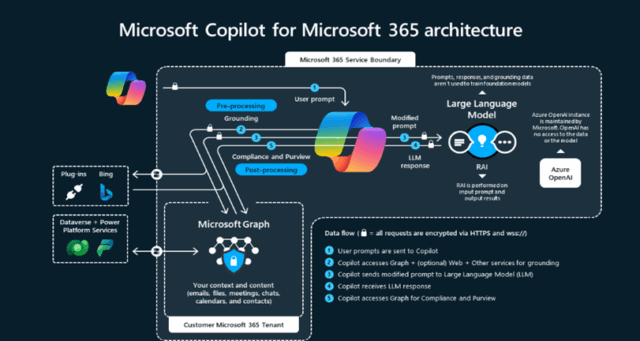
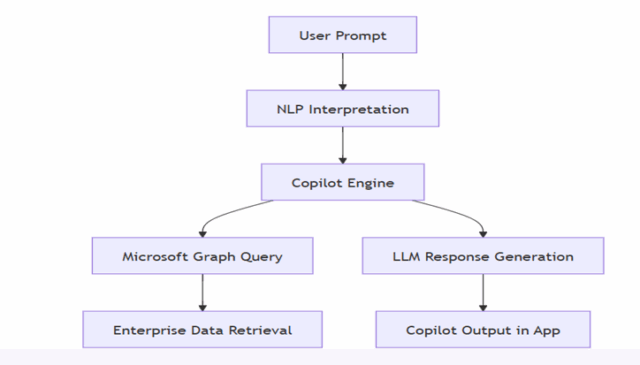
]]>Microsoft Copilot is an AI-powered assistant embedded across the Microsoft 365 ecosystem, designed to enhance productivity, streamline workflows, and empower users with intelligent automation. Built on Large Language Models (LLMs) like GPT-4 and GPT-5, and tightly integrated with Microsoft Graph, Copilot transforms how professionals interact with tools like Word, Excel, PowerPoint, Outlook, and Teams.

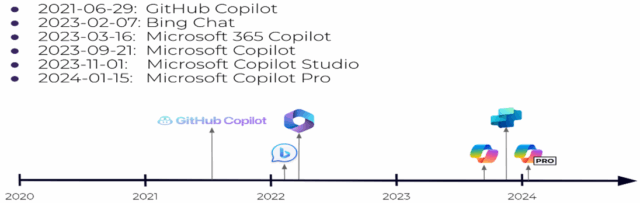
Microsoft Copilot is an LLM-powered AI assistant by Microsoft, similar to OpenAI’s ChatGPT. Under the Copilot brand, Microsoft has released a variety of products. Here’s a timeline of key releases:

Copilot offers a wide range of capabilities. Specifically, it supports:
These features span across multiple Microsoft 365 apps, making Copilot a versatile productivity tool.


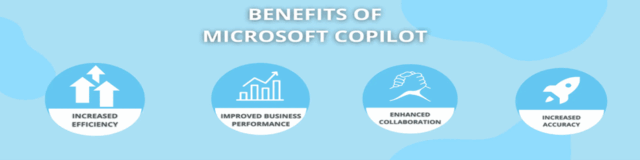
Copilot delivers several benefits:
As a result, organizations can achieve measurable productivity gains.

Automates repetitive tasks like drafting emails, generating summaries, or designing slides—freeing up more time for strategic work
Helps generate polished content, insightful visual designs, and improves presentation efficacy.
Works natively within existing Microsoft tools, reducing learning curves and ensuring smooth adoption.
Satya Nadella uses GPT-5–powered Copilot for prompts like meeting prep, project updates, time categorization, and decision analysis
Ingest data from ERP, CRM, and internal systems to enrich Copilot’s knowledge base, letting it reason over broader, organization-specific content, while respecting access controls.
Build or use prebuilt AI agents to automate workflows—e.g., employee onboarding, sales leads creation, IT requests—right from within Copilot.
Agents can:
Use the Copilot Retrieval API to programmatically access enterprise data indexes and integrate AI capabilities into custom applications or workflows, with full compliance and governance.

In summary, Microsoft Copilot is not just a productivity tool—it’s a strategic AI partner that empowers professionals across industries. From automating mundane tasks to enhancing creativity and collaboration, Copilot is reshaping the future of work.
]]>In today’s fast-paced digital workplace, agility, scalability, and collaboration aren’t just nice to have—they’re business-critical. If your organization is still on Microsoft SharePoint On-Premises, now is the time to make the move to SharePoint Online. Here’s why this isn’t just a technology upgrade—it’s a strategic leap forward.
SharePoint Online empowers your workforce with secure access to content from virtually anywhere. Whether your team is remote, hybrid, or on the go, they can collaborate in real time without being tethered to a corporate network or VPN.
Forget about manual patching and version upgrades. SharePoint Online is part of Microsoft 365, which means you automatically receive the latest features, security updates, and performance improvements—without the overhead of managing infrastructure.
Maintaining on-premises servers is expensive and resource-intensive. By moving to SharePoint Online, you eliminate hardware costs, reduce IT overhead, and streamline operations. Plus, Microsoft handles the backend, so your team can focus on innovation instead of maintenance.
Microsoft invests heavily in security, offering built-in compliance tools, data loss prevention, and advanced threat protection. SharePoint Online is designed to meet global standards and industry regulations, giving you peace of mind that your data is safe.
SharePoint Online integrates effortlessly with Microsoft Teams, OneDrive, Power Automate, and Power BI—enabling smarter workflows, better insights, and more connected experiences across your organization.
Whether you’re a small business or a global enterprise, SharePoint Online scales with your needs. You can easily add users, expand storage, and adapt to changing business demands without worrying about infrastructure limitations.
Empathy, Resilience, Innovation, and Speed: The Blueprint for Intelligent Healthcare Transformation
Forrester’s recent report, Becoming An Intelligent Healthcare Organization Is An Attainable Goal, Not A Lost Cause, confirms what healthcare executives already know: transformation is no longer optional.
Perficient is proud to be quoted in this research, which outlines a pragmatic framework for becoming an intelligent healthcare organization (IHO)—one that scales innovation, strengthens clinical and operational performance, and delivers measurable impact across the enterprise and the populations it serves.
Healthcare leaders are under pressure to deliver better outcomes, reduce costs, and modernize operations, all while navigating fragmented systems and siloed departments. The journey to transformation requires more than technology; it demands strategic clarity, operational alignment, and a commitment to continuous improvement.
Forrester reports, “Among business and technology professionals at large US healthcare firms, only 63% agree that their IT organization can readily reallocate people and technologies to serve the newest business priority; 65% say they have enterprise architecture that can quickly and efficiently support major changes in business strategy and execution.”
Despite widespread investment in digital tools, many healthcare organizations struggle to translate those investments into enterprise-wide impact. Misaligned priorities, inconsistent progress across departments, and legacy systems often create bottlenecks that stall innovation and dilute momentum.
These challenges aren’t just technical or organizational. They’re strategic. Enterprise leaders can no longer sit on the sidelines and play the “wait and see” game. They must shift from reactive IT management to proactive digital orchestration, where technology, talent, and transformation are aligned to business outcomes.
Business transformation is not a fleeting trend. It’s an essential strategy for healthcare organizations that want to remain competitive as the marketplace evolves.
Forrester’s report identifies four hallmarks of intelligent healthcare organizations, emphasizing that transformation is not a destination but a continuous practice.
To overcome transformation barriers, healthcare organizations must align consumer expectations, digital infrastructure, clinical workflows, and data governance with strategic business goals.
A defining trait of intelligent healthcare organizations is a commitment to human-centered experiences.
As Forrester notes, “The most intelligent organizations excel at empathetic, swift, and resilient innovation to continuously deliver new value for customers and stay ahead of the competition.”
Empathy is a performance driver. Organizations that prioritize human-centered care see higher engagement, better adherence, and stronger loyalty.
Our experts help clients reimagine care journeys using journey sciences, predictive analytics, integrated CRM and CDP platforms, and cloud-native architectures that support scalable personalization. But personalization without protection is a risk. That’s why empathy must extend beyond experience design to include ethical, secure, and responsible AI adoption.
Healthcare organizations face unique constraints, including HIPAA, PHI, and PII regulations that limit the utility of plug-and-play AI solutions. To meet these challenges, we apply our PACE framework—Policies, Advocacy, Controls, and Enablement—to ensure AI is not only innovative but also rooted in trust.
This approach ensures AI is deployed with purpose, aligned to business goals, and embedded with safeguards that protect consumers and care teams alike. It also supports the creation of reusable architectures that blend scalable services with real-time monitoring, which is critical for delivering fast, reliable, and compliant AI applications.
Responsible AI isn’t a checkbox. It’s a continuous practice. And in healthcare, it’s the difference between innovation that inspires trust and innovation that invites scrutiny.
Patient-led experiences must be grounded in a clear-eyed understanding that market disruption isn’t simply looming. It’s already here. To thrive, healthcare leaders must architect systems that flex under pressure and evolve with purpose. Resilience is more than operational; it’s also behavioral, cultural, and strategic.
Perficient’s Access to Care research reveals that friction in the care journey directly impacts health outcomes, loyalty, and revenue:
This sentiment should be a wakeup call for leaders. It clearly signals that consumers expect healthcare to meet both foundational needs (cost, access) and lifestyle standards (convenience, personalization, digital ease). When systems fail to deliver, patients disengage. And when caregivers—who often manage care for entire households—encounter barriers, the ripple effect is exponential.
To build resilience that drives retention and revenue, leaders must design systems that anticipate needs and remove barriers before they impact care. Resilient operations must therefore be designed to:
Consumers are blending survival needs with lifestyle demands. Intelligent healthcare organizations address both simultaneously.
Resilience also means preparing for the unexpected. Whether it’s regulatory shifts, staffing shortages, or competitive disruption, IHOs must be able to pivot quickly. That requires leaders to reimagine patient (and member) access as a strategic lever and prioritize digital transformation that eases the path to care.
Innovation without enterprise alignment is just noise—activity without impact. When digital initiatives are disconnected from business strategy, consumer needs, or operational realities, they create confusion, dilute resources, and fail to deliver meaningful outcomes. Fragmented innovation may look impressive in isolation, but without coordination, it lacks the momentum to drive true transformation.
To deliver real results, healthcare leaders must connect strategy, execution, and change readiness. In Forrester’s report, a quote from an interview with Priyal Patel emphasizes the importance of a shared strategic vision:
“Today’s decisions should be guided by long-term thinking, envisioning your organization’s business needs five to 10 years into the future.” — Priyal Patel, Director, Perficient
Our approach begins with strategic clarity. Using our Envision Framework, we help healthcare organizations rapidly identify opportunities, define a consumer-centric vision, and develop a prioritized roadmap that aligns with business goals and stakeholder expectations. This framework blends real-world insights with pragmatic planning, ensuring that innovation is both visionary and executable.
We also recognize that transformation is not just technical—it’s human. Organizational change management (OCM) ensures that teams are ready, willing, and able to adopt new ways of working. Through structured engagement, training, and sustainment, we help clients navigate the behavioral shifts required to scale innovation across departments and disciplines.
This strategic rigor is especially critical in healthcare, where innovation must be resilient, compliant, and deeply empathetic. As highlighted in our 2025 Digital Healthcare Trends report, successful organizations are those that align innovation with measurable business outcomes, ethical AI adoption, and consumer trust.
Perficient’s strategy and transformation services connect vision to execution, ensuring that innovation is sustainable. We partner with healthcare leaders to identify friction points and quick wins, build a culture of continuous improvement, and empower change agents across the enterprise.
You May Enjoy: Driving Company Growth With a Product-Driven Mindset
The ability to pivot, scale, and deliver quickly is becoming a defining trait of tomorrow’s healthcare leaders. The way forward requires a comprehensive digital strategy that builds the capabilities, agility, and alignment to stay ahead of evolving demands and deliver meaningful impact.
IHOs act quickly without sacrificing quality. But speed alone isn’t enough. Perficient’s strategic position emphasizes speed with purpose—where every acceleration is grounded in business value, ethical AI adoption, and measurable health outcomes.
Our experts help healthcare organizations move fast by:
This approach supports the Quintuple Aim: better outcomes, lower costs, improved experiences, clinician well-being, and health equity. It also ensures that innovation is not just fast. It’s focused, ethical, and sustainable.
Healthcare leaders don’t need more tools. They need a strategy that connects business imperatives, consumer demands, and an empowered workforce to drive transformation forward. Perficient equips organizations to move with confidence, clarity, and control.
We believe our inclusion in Forrester’s report underscores our role as a trusted advisor in intelligent healthcare transformation. From insight to impact, our healthcare expertise equips leaders to modernize, personalize, and scale care. We drive resilient, AI-powered transformation to shape the experiences and engagement of healthcare consumers, streamline operations, and improve the cost, quality, and equity of care.
We have been trusted by the 10 largest health systems and the 10 largest health insurers in the U.S., and Modern Healthcare consistently ranks us as one of the largest healthcare consulting firms.
Our strategic partnerships with industry-leading technology innovators—including AWS, Microsoft, Salesforce, Adobe, and more—accelerate healthcare organizations’ ability to modernize infrastructure, integrate data, and deliver intelligent experiences. Together, we shatter boundaries so you have the AI-native solutions you need to boldly advance business.
We’re here to help you move beyond disconnected systems and toward a unified, data-driven future—one that delivers better experiences for patients, caregivers, and communities. Let’s connect and explore how you can lead with empathy, intelligence, and impact.
]]>